
Vue
泛型组件
- 组件 props 如何添加泛型,
<script setup lang="ts" generic="T">;vue 官网地址
<template>
  <div class="rtc-table">
    <el-table
      :border="border"
      :data="props.tableData"
      style="width: 100%"
      v-auto-height="autoHeight ? bottom : 0"
      v-bind="{ ...$attrs, ...tableConfig }"
    >
      <template v-for="item in curClums">
        <template v-if="item.type === 'selection'">
          <el-table-column
            :resizable="false"
            :prop="item.prop || ''"
            :label="item.label"
            :align="item.align || 'center'"
            :width="item.width"
            type="selection"
            v-bind="item.extral"
          >
          </el-table-column>
        </template>
        <el-table-column
          v-else
          :resizable="false"
          :prop="item.prop || ''"
          :label="item.label"
          :align="item.align || 'center'"
          :width="item.width"
          v-bind="item.extral"
        >
          <template #header="scope: TableColumnDefaultSlot">
            <slot name="header" v-bind="{ ...scope, colItem: item }">
              <ReText :tippyProps="{ content: scope.column.label }">
                {{ scope.column.label || "-" }}
              </ReText>
            </slot>
          </template>
          <template #default="scope: TableColumnDefaultSlot">
            <slot :name="item.slotName" v-bind="scope">
              <ReText :tippyProps="{ content: scope.row[item.prop] }">
                {{ scope.row[item.prop] || "-" }}
              </ReText>
            </slot>
          </template>
        </el-table-column>
      </template>
    </el-table>
    <div v-if="props.pagination" class="table-pagination">
      <el-pagination
        v-model:current-page="props.pagingInfo.pageIndex"
        v-model:page-size="props.pagingInfo.pageSize"
        :page-sizes="[10, 20, 50, 100]"
        :small="small"
        background
        layout="total, sizes, prev, pager, next, jumper"
        :total="props.pagingInfo.total"
        @size-change="handleSizeChange"
        @current-change="handleCurrentChange"
      />
    </div>
  </div>
</template>

<script setup lang="ts" generic="T">
import { computed, ref } from "vue";
import { ReText } from "@/components/ReText";
import type { ColumnItem, PagingInfo } from "./table";
import { type RenderRowData, type TableProps } from "element-plus";
defineOptions({
  name: "RtcTable",
});

type TableColumnDefaultSlot = RenderRowData<T>;

// 组件属性类型声明不能通过外部导入,否则 TableColumnDefaultSlot 会不生效
interface Props {
  tableData: T[];
  columns: ColumnItem<T>[];
  pagination?: boolean;
  pagingInfo?: PagingInfo;
  tableConfig?: Omit<TableProps<T>, "data">;
  autoHeight?: boolean;
  bottom?: number; // 距离底部距离
  border?: boolean; // 表格边框
}
const props = withDefaults(defineProps<Props>(), {
  tableData: () => [] as T[],
  columns: () => [],
  pagination: true,
  pagingInfo: () => ({
    pageIndex: 1,
    pageSize: 10,
    total: 0,
  }),
  tableConfig: () => ({}),
  bottom: 80,
  border: true,
});

const emits = defineEmits(["update:pagingInfo", "pagingChange"]);

const curClums = computed(() => {
  return props.columns.filter((item) => {
    if (typeof item.show === "function") return item.show(item);
    return item.show === undefined || item.show;
  });
});
const small = ref(false);

const emitPagingInfo = (pagingInfo: PagingInfo) => {
  emits("update:pagingInfo", pagingInfo);
  emits("pagingChange", pagingInfo);
};
const handleSizeChange = (val: number) => {
  const pagingInfo = { ...props.pagingInfo, pageSize: val, pageIndex: 1 };
  emitPagingInfo(pagingInfo);
};
const handleCurrentChange = (val: number) => {
  const pagingInfo = { ...props.pagingInfo, pageIndex: val };
  emitPagingInfo(pagingInfo);
};
</script>

<style scoped lang="scss">
.table-pagination {
  display: flex;
  justify-content: flex-end;
  margin-top: 20px;
}
</style>
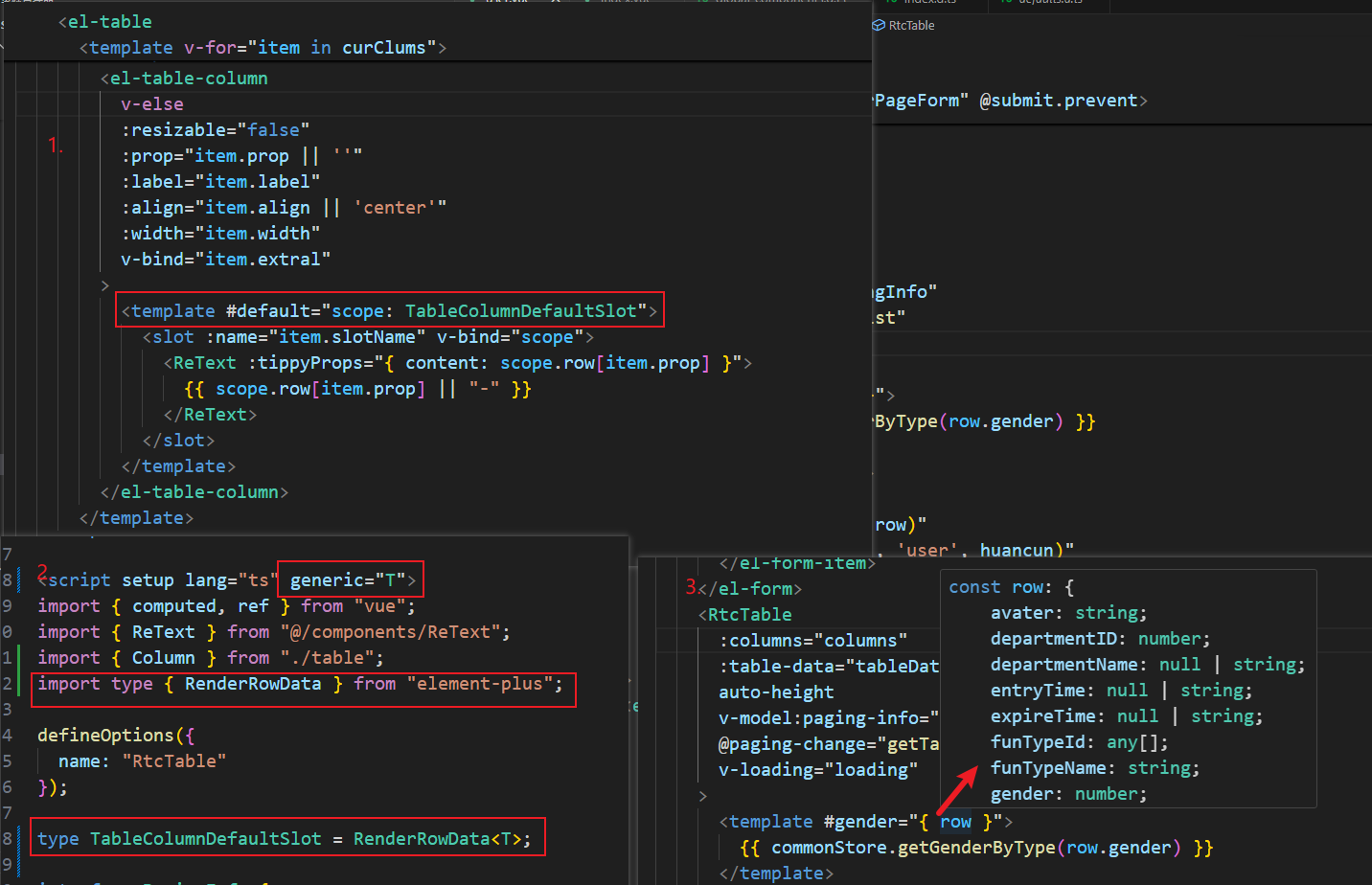
具体步骤如下:
- script 标签添加 generic 属性,
<script setup lang="ts" generic="T">
注意
使用 generic 支持泛型后,组件不能使用 export 导出类型,因此对于需要导出组件的类型,要放到单独的文件中。这个问题不知后面 vue 脚手架是否得到解决
- 给
tableData添加泛型约束:tableData: T[];
interface Props {
  tableData: T[]; // T 把组件接收到的泛型赋值给 tableData
  columns: ColumnItem<T>[];
  pagination?: boolean;
  pagingInfo?: PagingInfo;
  tableConfig?: Omit<TableProps<T>, "data">;
  autoHeight?: boolean;
  bottom?: number; // 距离底部距离
  border?: boolean; // 表格边框
}
- 指定插槽返回值类型
type TableColumnDefaultSlot = RenderRowData<T>;
- 在
template中使用
<template #header="scope: TableColumnDefaultSlot">
  <slot name="header" v-bind="{ ...scope, colItem: item }">
    <ReText :tippyProps="{ content: scope.column.label }">
      {{ scope.column.label || "-" }}
    </ReText>
  </slot>
</template>
<template #default="scope: TableColumnDefaultSlot">
  <slot :name="item.slotName" v-bind="scope">
    <ReText :tippyProps="{ content: scope.row[item.prop] }">
      {{ scope.row[item.prop] || "-" }}
    </ReText>
  </slot>
</template>
- 插槽:在模板中就可以用鼠标看到属性的类型
递归组件
element plus 封装 table 组件,使用递归生成 el-table-column 实现多级表头
- 封装
tableColumn递归组件
<template>
  <template v-if="props.cItem.type === 'selection'">
    <el-table-column v-bind="{ type: props.cItem.type, ...columnProps }" />
  </template>
  <el-table-column v-else v-bind="columnProps">
    <template #header="scope: TableColumnDefaultSlot">
      <slot name="header" v-bind="{ ...scope, colItem: cItem }">
        <ReText :tippyProps="{ content: scope.column.label }">
          {{ scope.column.label || "-" }}
        </ReText>
      </slot>
    </template>
    <template #default="scope: TableColumnDefaultSlot">
      <slot :name="props.cItem.slotName" v-bind="scope">
        <ReText :tippyProps="{ content: scope.row[props.cItem.prop] }">
          {{
            scope.row[props.cItem.prop] === 0
              ? scope.row[props.cItem.prop]
              : scope.row[props.cItem.prop] || "-"
          }}
        </ReText>
      </slot>
      <tableColumn v-for="sitem in colChildren" :cItem="sitem">
        <template #header="scope: TableColumnDefaultSlot">
          <slot name="header" v-bind="scope"></slot>
        </template>
        <template #[sitem.slotName]="scope: TableColumnDefaultSlot">
          <slot :name="sitem.slotName" v-bind="scope"></slot>
        </template>
      </tableColumn>
    </template>
  </el-table-column>
</template>

<script setup lang="ts" generic="T">
import { ReText } from "@/components/ReText";
import { type RenderRowData } from "element-plus";
import type { ColumnItem } from "./table";
import { computed } from "vue";

type TableColumnDefaultSlot = RenderRowData<T>;
type TableColumnsItem = ColumnItem<T>;

interface Props {
  cItem: TableColumnsItem;
}
defineOptions({ name: "tableColumn" });
const props = withDefaults(defineProps<Props>(), {
  cItem: () => ({}) as TableColumnsItem,
});
const columnProps = computed(() => {
  const { cItem } = props;
  return {
    resizable: cItem.resizable || false,
    prop: cItem.prop,
    label: cItem.label,
    align: cItem.align || "center",
    width: cItem.width,
    ...cItem.extral,
  };
});
const colChildren = computed(() => {
  const { cItem } = props;
  if (cItem.children && cItem.children.length) {
    return cItem.children.filter((item) => item.show);
  }
  return [];
});
</script>
- 封装
table组件,使用tableColumn组件
<template>
  <div class="rtc-table">
    <diyColumn
      v-if="showSetting"
      :columns="curClums"
      @change="onColumnChange"
    />
    <el-table
      :border="border"
      :data="props.tableData"
      style="width: 100%"
      v-auto-height="autoHeight ? bottom : 0"
      v-bind="{ ...$attrs, ...tableConfig }"
    >
      <template v-for="item in showColumns">
        <tableColumn v-if="item.show" :cItem="item">
          <template v-for="(_, key) in slots" #[key]="scope">
            <slot :name="key" v-bind="scope"></slot>
          </template>
        </tableColumn>
      </template>
    </el-table>
    <div v-if="props.pagination" class="table-pagination">
      <el-pagination
        v-model:current-page="props.pagingInfo.pageIndex"
        v-model:page-size="props.pagingInfo.pageSize"
        :page-sizes="[10, 20, 50, 100]"
        :small="small"
        background
        layout="total, sizes, prev, pager, next, jumper"
        :total="props.pagingInfo.total"
        @size-change="handleSizeChange"
        @current-change="handleCurrentChange"
      />
    </div>
  </div>
</template>

<script setup lang="ts" generic="T">
import { ref, watch, useSlots } from "vue";
import type { ColumnItem, PagingInfo } from "./table";
import { type TableProps } from "element-plus";

import diyColumn from "./diyColumn.vue";
import tableColumn from "./tableColumn.vue";
import { deepClone } from "@/utils/data";

defineOptions({ name: "RtcTable" });

type TableColumnsItem = ColumnItem<T>;
interface Props {
  tableData: T[];
  columns: TableColumnsItem[];
  pagination?: boolean;
  pagingInfo?: PagingInfo;
  tableConfig?: Omit<TableProps<T>, "data">;
  autoHeight?: boolean;
  bottom?: number; // 距离底部距离
  border?: boolean; // 表格边框
  showSetting?: boolean;
}
const props = withDefaults(defineProps<Props>(), {
  tableData: () => [] as T[],
  columns: () => [],
  pagination: true,
  pagingInfo: () => ({
    pageIndex: 1,
    pageSize: 10,
    total: 0,
  }),
  tableConfig: () => ({}),
  bottom: 80,
  border: true,
  showSetting: false,
});

const emits = defineEmits(["update:pagingInfo", "pagingChange"]);
const slots = useSlots();

const small = ref(false);

const emitPagingInfo = (pagingInfo: PagingInfo) => {
  emits("update:pagingInfo", pagingInfo);
  emits("pagingChange", pagingInfo);
};
const handleSizeChange = (val: number) => {
  const pagingInfo = { ...props.pagingInfo, pageSize: val, pageIndex: 1 };
  emitPagingInfo(pagingInfo);
};
const handleCurrentChange = (val: number) => {
  const pagingInfo = { ...props.pagingInfo, pageIndex: val };
  emitPagingInfo(pagingInfo);
};

const curClums = ref<TableColumnsItem[]>([]);
const showColumns = ref<TableColumnsItem[]>([]);
const initColumns = (list: TableColumnsItem[]) => {
  list.forEach((item) => {
    item._columnKey = `${item.prop}_${item.label}`;
    item.show = item.show === undefined || item.show;
    if (item.children && item.children.length) {
      initColumns(item.children);
    }
  });
};
watch(
  () => props.columns,
  () => {
    curClums.value = deepClone(props.columns);
    initColumns(curClums.value);
    showColumns.value = curClums.value;
  },
  { immediate: true, deep: true }
);
const onColumnChange = (value: TableColumnsItem[]) => {
  showColumns.value = value;
};
</script>

<style scoped lang="scss">
.rtc-table {
  position: relative;
}
.table-pagination {
  display: flex;
  justify-content: flex-end;
  margin-top: 20px;
}
</style>
难点
父组件如何给递归组件传递插槽?
- 使用 useSlots 钩子,把父组件接收到的插槽,传递给递归组件
- 细节
slots = useSlots()返回插槽对象,对象的 key 记录的是插槽的名称,value 是插槽对应的函数(调用该函数会得到插槽的 vdom 对象),因此遍历 slots 对象,把父组件接收到的插槽,动态传到递归组件 - 核心代码如下
const slots = useSlots();
<template v-for="item in showColumns">
  <tableColumn v-if="item.show" :cItem="item">
    <template v-for="(_, key) in slots" #[key]="scope">
      <slot :name="key" v-bind="scope"></slot>
    </template>
  </tableColumn>
</template>
多系统共享登录方案
在 Vue 项目中,如果你希望在登录了 A 系统后,能够无缝访问 B 系统而不需要再次登录,可以考虑以下几种方法来传递登录态:
1. 使用 Token 传递
如果 A 系统和 B 系统都支持 Token 认证(如 JWT),你可以在 A 系统登录后,将获取到的 Token 通过 URL 或者 HTTP 请求的方式传递给 B 系统。
步骤:
在 A 系统中获取 Token:用户登录后,A 系统会返回一个 Token。
构造 B 系统的 URL:在 A 系统中,点击按钮时,构造 B 系统的 URL,并将 Token 作为参数附加到 URL 中。例如:
const token = "your_token_here"; // 从 A 系统获取的 Token
const bSystemUrl = `https://b-system.com?token=${token}`;
window.location.href = bSystemUrl; // 跳转到 B 系统
在 B 系统中接收 Token:B 系统在接收到请求时,从 URL 中提取 Token,并进行验证。如果 Token 有效,则允许用户访问。
2. 使用 SSO(单点登录)
如果 A 系统和 B 系统都支持单点登录(SSO),可以通过 SSO 机制来实现无缝登录。
步骤:
- 用户在 A 系统登录:用户在 A 系统中进行登录。
- A 系统生成 SSO Token:A 系统生成一个 SSO Token,并将其存储在 Cookie 或 Local Storage 中。
- 跳转到 B 系统:用户点击按钮跳转到 B 系统。
- B 系统验证 SSO Token:B 系统在接收到请求时,从 Cookie 或 Local Storage 中获取 SSO Token,并进行验证。如果验证通过,则用户可以直接访问 B 系统。
3. 使用 OAuth 2.0
如果 A 系统和 B 系统都支持 OAuth 2.0,可以使用 OAuth 2.0 的授权码流程来实现。
步骤:
- 用户在 A 系统登录:用户在 A 系统中进行登录。
- 获取授权码:A 系统获取到授权码。
- 跳转到 B 系统:用户点击按钮跳转到 B 系统,并附带授权码。
- B 系统使用授权码获取 Token:B 系统使用授权码向 A 系统请求 Token,如果成功,则用户可以直接访问 B 系统。
4. 使用 Cookie 共享
如果 A 系统和 B 系统在同一个域名下(或子域名下),可以通过设置 Cookie 来共享登录态。
步骤:
- 在 A 系统中设置 Cookie:用户登录后,在 A 系统中设置一个 Cookie,包含登录信息。
- 跳转到 B 系统:用户点击按钮跳转到 B 系统。
- B 系统读取 Cookie:B 系统在接收到请求时,读取 Cookie 中的登录信息,并进行验证。
注意事项
- 安全性:在传递 Token 或者 Cookie 时,确保使用 HTTPS,以防止中间人攻击。
- Token 过期:需要考虑 Token 的过期时间,确保用户在访问 B 系统时,Token 是有效的。
- 跨域问题:如果 A 系统和 B 系统不在同一个域名下,可能会遇到跨域问题,需要进行相应的处理。
选择合适的方法取决于你的具体需求和系统架构。
实现步骤
兼容低版本浏览器
- 方案一:使用 babel-polyfill
安装依赖包:"core-js": "^3.38.1","@babel/preset-env": "^7.25.4","vite-plugin-babel": "^1.2.0","regenerator-runtime": "^0.14.1"
创建 .babelrc 文件,配置如下:
{
  "presets": [
    [
      "@babel/preset-env",
      {
        "targets": ["Chrome >= 52"],
        "useBuiltIns": "entry",
        "corejs": 3
      }
    ]
  ]
}
在 main.ts 文件中
import "core-js/stable";
import "core-js/features/object/entries";
import "core-js/features/object/values";
import "regenerator-runtime/runtime";
注意
以上导入必须放到 main.ts 文件顶部,否则不会生效
- 方案二:vite 官方推荐方案,使用
@vitejs/plugin-legacy
// vite.config.ts
import legacyPlugin from "@vitejs/plugin-legacy";
export default defineConfig({
  plugins: [
    // 浏览器兼容问题配置
    legacyPlugin({
      targets: ["firefox < 59", "chrome 52"],
      additionalLegacyPolyfills: ["regenerator-runtime/runtime"],
      renderLegacyChunks: true,
      modernPolyfills: true, // 是否使用现代浏览器的 polyfill,默认 false。所以需要设置为 true,polyfills选项才会生效。
      polyfills: [
        "es.symbol",
        "es.array.filter",
        "es.promise",
        "es.promise.finally",
        "es/map",
        "es/set",
        "es.array.for-each",
        "es.object.define-properties",
        "es.object.define-property",
        "es.object.get-own-property-descriptor",
        "es.object.get-own-property-descriptors",
        "es.object.keys",
        "es.object.to-string",
        "es.object.values",
        "es.object.entries",
        "es.object.from-entries",
        "es.array.includes",
        "es.string.includes",
        "es.array.flat-map",
        "web.dom-collections.for-each",
        "esnext.global-this",
        "esnext.string.match-all",
      ],
    }),
  ],
});
注意
modernPolyfills选项必须设置为 true,选项polyfills才会生效。- vite 版本 5 以上,不安装
terser插件也不会报错,terser插件主要用来压缩代码,而浏览器兼容问题配置不需要压缩代码,所以不需要安装。
.browserslistrc 文件配置如下:
Chrome >= 52
Firefox >= 78
Safari >= 13
Edge >= 88
name 属性
组件的 name 属性作用:
- 用于在 Vue Devtools 中显示组件的名字;
用于使用 keep-alive 缓存组件(不设置 name 属性,则不会缓存组件);- 用于使用路由懒加载;
- 用于使用全局注册;
- 用于使用自定义指令。
promise 队列发送请求, 控制每次请求数量
vue3 动态组件
<template>
  <div>
    <component :is="asyncComponent"></component>
  </div>
</template>

<script lang="ts">
import { defineAsyncComponent } from "vue";
// 使用 defineAsyncComponent 定义异步组件
const asyncComponent = defineAsyncComponent(
  () => import("./components/HelloWorld.vue")
);
</script>
<script>
export default {
  name: "App",
  methods: {
    onLeftMove: debounce(
      function (event) {
        const draggedEl = event.dragged; // 被拖拽的元素
        const targetEl = event.related; // 目标位置的参考元素(放置位置)
        const toGroup = event.to.dataset.group; // 目

        // 获取元素类型
        const draggedType = draggedEl.dataset.type;
        const targetType = targetEl.dataset.type;

        console.log("event.to.dataset.group", draggedEl, targetEl, toGroup);
        console.log("type: ", draggedType, targetType);

        if (event.data.name === "SerialNumber") {
          if (
            targetType === "TableList" ||
            targetEl.classList.contains("TableList")
          ) {
            if (this.isErrorMsg) return false;
            this.isErrorMsg = true;
            this.$message({
              type: "error",
              message: "明细表组件不能添加流水号!",
              onClose: () => (this.isErrorMsg = false),
            });
            return false;
          }
          if (!this._formConfig.hasSerialNumber) {
            return true;
          } else {
            if (this.isErrorMsg) return false;
            this.isErrorMsg = true;
            console.log("targetType", targetType);
            this.$message({
              type: "error",
              message: "流水号组件只能添加一次!",
              onClose: () => (this.isErrorMsg = false),
            });
            return false;
          }
        }
        return true;
      },
      300,
      true
    ),
  },
};
</script>
Vue Cli 3.x/4.x 升级到 5.x
- 参照 vue-cli5.x 版本脚手架创建的项目,查看
package.json文件,将vue-cli-service升级到最新版本。
package.json
升级前
{
  "devDependencies": {
    "@vue/cli-plugin-babel": "4.4.4",
    "@vue/cli-plugin-eslint": "4.4.4",
    "@vue/cli-plugin-unit-jest": "4.4.4",
    "@vue/cli-service": "4.4.4",
    "@vue/test-utils": "1.0.0-beta.29",
    "autoprefixer": "9.5.1",
    "babel-eslint": "10.1.0",
    "babel-jest": "23.6.0",
    "babel-plugin-dynamic-import-node": "2.3.3",
    "chalk": "2.4.2",
    "connect": "3.6.6",
    "eslint": "6.7.2",
    "eslint-plugin-vue": "6.2.2",
    "html-webpack-plugin": "3.2.0",
    "mockjs": "1.0.1-beta3",
    "runjs": "4.3.2",
    "sass": "1.26.8",
    "sass-loader": "8.0.2",
    "script-ext-html-webpack-plugin": "2.1.3",
    "serve-static": "1.13.2",
    "svg-sprite-loader": "4.1.3",
    "svgo": "1.2.2",
    "vue-template-compiler": "2.6.10"
  }
}
升级后
{
  "devDependencies": {
    "@babel/core": "^7.12.16",
    "@babel/eslint-parser": "^7.12.16",
    "@vue/cli-plugin-babel": "~5.0.0",
    "@vue/cli-plugin-eslint": "~5.0.0",
    "@vue/cli-plugin-router": "~5.0.0",
    "@vue/cli-plugin-vuex": "~5.0.0",
    "@vue/cli-service": "~5.0.0",
    "@vue/test-utils": "1.0.0-beta.29",
    "autoprefixer": "9.5.1",
    "babel-jest": "23.6.0",
    "babel-plugin-dynamic-import-node": "2.3.3",
    "chalk": "2.4.2",
    "connect": "3.6.6",
    "cross-env": "^7.0.3",
    "eslint": "^7.32.0",
    "eslint-config-prettier": "^8.3.0",
    "eslint-plugin-prettier": "^4.0.0",
    "eslint-plugin-vue": "^8.0.3",
    "html-webpack-plugin": "3.2.0",
    "mockjs": "1.0.1-beta3",
    "path-browserify": "^1.0.1",
    "prettier": "^2.4.1",
    "runjs": "4.3.2",
    "sass": "1.26.8",
    "sass-loader": "8.0.2",
    "script-ext-html-webpack-plugin": "2.1.3",
    "serve-static": "1.13.2",
    "svg-sprite-loader": "^6.0.11",
    "svgo": "1.2.2",
    "vue-template-compiler": "^2.6.14",
    "webpack-bundle-analyzer": "^4.10.2"
  }
}
- 添加
.prettierignore,.prettierrc文件,配置如下:
.prettierignore
dist
.local
.output.js
node_modules
.nvmrc

**/*.svg
**/*.sh

public
.npmrc
*-lock.yaml
.prettierrc
{
  "$schema": "https://json.schemastore.org/prettierrc",
  "semi": true,
  "singleQuote": false,
  "trailingComma": "es5",
  "tabWidth": 2,
  "printWidth": 80,
  "bracketSpacing": true,
  "vueIndentScriptAndStyle": false
}
- 修改
.eslintignore和.eslintrc.js文件,配置如下:
.eslintignore
build/*.js
src/assets
public
dist
.eslintrc.js
module.exports = {
  root: true,
  env: {
    node: true,
  },
  extends: [
    "plugin:vue/essential",
    "eslint:recommended",
    "plugin:prettier/recommended",
  ],
  parserOptions: {
    parser: "@babel/eslint-parser",
  },
  rules: {
    "no-console": process.env.NODE_ENV === "production" ? "warn" : "off",
    "no-debugger": process.env.NODE_ENV === "production" ? "warn" : "off",
  },
};
- 修改
vue.config.js文件,配置如下:
升级后
const { defineConfig } = require("@vue/cli-service");
const BundleAnalyzerPlugin =
  require("webpack-bundle-analyzer").BundleAnalyzerPlugin;
const path = require("path");
const port = process.env.port || process.env.npm_config_port || 9528; // dev port
const isDev = process.env.NODE_ENV === "development";
const isMock = process.env.VUE_APP_MOCK === "true";

function resolve(dir) {
  return path.join(__dirname, dir);
}
module.exports = defineConfig({
  transpileDependencies: true,
  productionSourceMap: false,
  lintOnSave: false,
  devServer: {
    port,
    open: false,
    client: {
      overlay: false, // 关闭全屏错误覆盖层
    },
    //代理本地接口地址
    proxy: {
      [process.env.VUE_APP_BASE_API]: {
        target: "http://192.168.1.127:18350/",
        changeOrigin: true,
        pathRewrite: {
          ["^" + process.env.VUE_APP_BASE_API]: "",
        },
        bypass: (req) => {
          // mock 模式下,所有请求都走 mock 服务,不再向后端(target)发送请求,
          // 联调时,记得修改 VUE_APP_MOCK = 'false' 关掉 mock 模式
          if (isMock) return req.path;
        },
      },
    },
    setupMiddlewares: (middlewares, devServer) => {
      if (!devServer) {
        throw new Error("webpack-dev-server is not defined");
      }
      // 按需加载 Mock
      if (isDev && isMock) {
        require("./mock/mock-server.js")(devServer.app);
      }
      return middlewares;
    },
  },
  configureWebpack: {
    // provide the app's title in webpack's name field, so that
    // it can be accessed in index.html to inject the correct title.
    name: process.env.VUETR_APP_NAME,
    resolve: {
      alias: {
        "@": resolve("src"),
      },
      fallback: {
        // 需要安装 path-browserify 依赖,因为 webpack 5 默认不再支持 Node.js 核心模块
        // 项目中的组件使用到了path模块(import path from "path"),需要使用浏览器兼容的 path 模块
        // 使用 import path from "path-browserify" 导入
        path: require.resolve("path-browserify"), // 引用浏览器兼容的 path 模块
      },
    },
    optimization: {
      splitChunks: {
        chunks: "all",
        minSize: 20000, // 20KB
        maxSize: 250000, // 250KB
        cacheGroups: {
          // 核心第三方库单独打包
          vue: {
            test: /[\\/]node_modules[\\/](vue|vue-router|vuex)[\\/]/,
            name: "chunk-vue",
            priority: 20,
          },
          // UI库单独打包
          elementUI: {
            test: /[\\/]node_modules[\\/]element-ui[\\/]/,
            name: "chunk-element",
            priority: 15,
          },
          // 其他node_modules打包
          vendors: {
            test: /[\\/]node_modules[\\/]/,
            name: "chunk-vendors",
            priority: 10,
            reuseExistingChunk: true,
          },
          // 公共模块
          common: {
            name: "chunk-common",
            minChunks: 2,
            priority: 5,
            reuseExistingChunk: true,
          },
        },
      },
    },
    plugins: [
      process.env.ANALYZE === "true" &&
        new BundleAnalyzerPlugin({
          openAnalyzer: false, // 是否自动打开浏览器
        }),
    ],
  },
  chainWebpack(config) {
    // 清除默认的 SVG 规则,因为默认配置会导致 svg-sprite-loader 无法正常工作,
    // 项目中使用<svg-icon icon-class="user" />组件渲染不出 SVG 图标。
    // 1. 清除默认的 SVG 规则
    config.module.rule("svg").uses.clear(); // 确保完全清除原有规则
    config.module.rule("svg").exclude.add(resolve("src/icons")).end();
    // 2. 新增 icons 规则
    config.module
      .rule("icons")
      .test(/\.svg$/)
      .include.add(resolve("src/icons"))
      .end()
      .use("svg-sprite-loader")
      .loader("svg-sprite-loader")
      .options({ symbolId: "icon-[name]" })
      .end();

    config.module
      .rule("vue")
      .use("vue-loader")
      .tap((options) => {
        options.compilerOptions.preserveWhitespace = true;
        return options;
      });
  },
});
升级前
"use strict";
const path = require("path");
const defaultSettings = require("./src/settings.js");
// const { codeInspectorPlugin } = require("code-inspector-plugin");
function resolve(dir) {
  return path.join(__dirname, dir);
}

const name = defaultSettings.title || "vue Admin Template"; // page title
const port = process.env.port || process.env.npm_config_port || 9528; // dev port
const isDev = process.env.NODE_ENV === "development";
const isProd = process.env.NODE_ENV === "production";
const isMock = process.env.VUE_APP_MOCK === "true";

module.exports = {
  publicPath: "/",
  outputDir: "dist",
  assetsDir: "static",
  lintOnSave: isDev,
  productionSourceMap: false,
  devServer: {
    port: port,
    open: false,
    overlay: {
      warnings: false,
      errors: true,
    },
    //代理本地接口地址
    proxy: {
      [process.env.VUE_APP_BASE_API]: {
        target: "http://192.168.1.127:18350/",
        changeOrigin: true,
        pathRewrite: {
          ["^" + process.env.VUE_APP_BASE_API]: "",
        },
        bypass: (req) => {
          // mock 模式下,所有请求都走 mock 服务,不再向后端(target)发送请求,
          // 联调时,记得修改 VUE_APP_MOCK = 'false' 关掉 mock 模式
          if (isMock) return req.path;
        },
      },
    },
    before: isDev && isMock ? require("./mock/mock-server.js") : null,
  },
  configureWebpack: {
    // provide the app's title in webpack's name field, so that
    // it can be accessed in index.html to inject the correct title.
    name: name,
    resolve: {
      alias: {
        "@": resolve("src"),
      },
    },
  },
  chainWebpack(config) {
    // it can improve the speed of the first screen, it is recommended to turn on preload
    config.plugin("preload").tap(() => [
      {
        rel: "preload",
        // to ignore runtime.js
        // https://github.com/vuejs/vue-cli/blob/dev/packages/@vue/cli-service/lib/config/app.js#L171
        fileBlacklist: [/\.map$/, /hot-update\.js$/, /runtime\..*\.js$/],
        include: "initial",
      },
    ]);

    // when there are many pages, it will cause too many meaningless requests
    config.plugins.delete("prefetch");

    // set svg-sprite-loader
    config.module.rule("svg").exclude.add(resolve("src/icons")).end();
    config.module
      .rule("icons")
      .test(/\.svg$/)
      .include.add(resolve("src/icons"))
      .end()
      .use("svg-sprite-loader")
      .loader("svg-sprite-loader")
      .options({
        symbolId: "icon-[name]",
      })
      .end();

    config.when(isProd, (config) => {
      config
        .plugin("ScriptExtHtmlWebpackPlugin")
        .after("html")
        .use("script-ext-html-webpack-plugin", [
          {
            // `runtime` must same as runtimeChunk name. default is `runtime`
            inline: /runtime\..*\.js$/,
          },
        ])
        .end();
      config.optimization.splitChunks({
        chunks: "all",
        cacheGroups: {
          libs: {
            name: "chunk-libs",
            test: /[\\/]node_modules[\\/]/,
            priority: 10,
            chunks: "initial", // only package third parties that are initially dependent
          },
          elementUI: {
            name: "chunk-elementUI", // split elementUI into a single package
            priority: 20, // the weight needs to be larger than libs and app or it will be packaged into libs or app
            test: /[\\/]node_modules[\\/]_?element-ui(.*)/, // in order to adapt to cnpm
          },
          commons: {
            name: "chunk-commons",
            test: resolve("src/components"), // can customize your rules
            minChunks: 3, //  minimum common number
            priority: 5,
            reuseExistingChunk: true,
          },
        },
      });
      // https:// webpack.js.org/configuration/optimization/#optimizationruntimechunk
      config.optimization.runtimeChunk("single");
    });
  },
};
jsx 组件(vue2.7.x)
this.$createElement方法返回vnode对象,可以用jsx语法渲染组件。想要使用jsx语法渲染组件,需要安装@vue/babel-preset-jsx依赖。 并且在.babelrc文件中配置@vue/babel-preset-jsx插件。
{
  "presets": [
    [
      "@vue/cli-plugin-babel/preset",
      {
        "useBuiltIns": "entry",
        "corejs": {
          "version": 3,
          "proposals": true
        },
        "jsx": "transform"
      }
    ]
  ],
  "plugins": [["@vue/babel-plugin-jsx"]]
}
this.$createElement方法可以传入一个对象,对象中含有render方法,可以在render方法中使用jsx语法渲染组件。
<script>
export default {
  methods: {
    notify() {
      if (this.notifyVm && !this.notifyVm.closed) return;
      this.notifyVm = this.$notify({
        title: "通知",
        duration: 0,
        position: "bottom-right",
        dangerouslyUseHTMLString: true,
        // 使用 JSX 语法渲染,自定义事件绑定 on[eventName],eventName要是驼峰命名法,如 toMatchProject
        message: this.$createElement({
          render: () => (
            <MatchProjectTips
              onToMatchProject={this.toMatchProject}
              onTipChange={this.tipChange}
            />
          ),
        }),

        // 使用 createElement 语法渲染
        message: this.$createElement(MatchProjectTips, {
          // 使用 on 绑定自定义事件
          on: {
            toMatchProject: this.toMatchProject,
            tipChange: this.tipChange,
          },
        }),
      });
    },
  },
};
</script>
使用 createElement 语法渲染
<script>
export default {
  methods: {
    notify() {
      if (this.notifyVm && !this.notifyVm.closed) return;
      this.notifyVm = this.$notify({
        title: "通知",
        duration: 0,
        position: "bottom-right",
        dangerouslyUseHTMLString: true,
        // 使用 createElement 语法渲染
        message: this.$createElement(MatchProjectTips, {
          // 使用 on 绑定自定义事件
          on: {
            toMatchProject: this.toMatchProject,
            tipChange: this.tipChange,
          },
        }),
      });
    },
  },
};
</script>
注意
this.$createElement(MatchProjectTips, {
  // 使用 on 绑定自定义事件
  on: {
    toMatchProject: this.toMatchProject,
    tipChange: this.tipChange,
  },
});
使用上面的写法数据改变后,不会更新视图MatchProjectTips,因为没有render函数,如果想要数据改变后,视图会更新,那么需要通过render函数渲染组件。
在单文件组件中的render函数中使用jsx语法渲染组件。
<script>
export default {
  props: {
    value: {
      type: Number,
      default: 1,
    },
  },
  data() {
    return {
      active: 1,
      tips: [
        { id: 1, label: "30分钟提醒一次", value: 30 },
        { id: 2, label: "1天提醒一次", value: 1440 },
        { id: 3, label: "3天提醒一次", value: 4320 },
        { id: 4, label: "7天提醒一次", value: 10080 },
      ],
    };
  },
  methods: {
    toMatchProject() {
      this.$emit("toMatchProject");
    },
    selectTip(payload) {
      this.active = payload.id;
      this.$emit("tipChange", payload);
    },
  },
  render(h) {
    return (
      <div class="notify-match-project">
        你好,DCM文件存在检查项目匹配错误!
        请及时完成手动匹配,以免影响辐射剂量以及和图像评分的计算!
        <el-button
          class="btn-view"
          type="text"
          size="small"
          onClick={this.toMatchProject}
        >
          立即查看
        </el-button>
        <el-popover
          placement="bottom-end"
          trigger="click"
          popper-class="diy-match-project__popover"
          scopedSlots={{
            reference: () => <i class="el-icon-more tips-more"></i>,
            default: () => (
              <div class="match-project-tips">
                {this.tips.map((item) => {
                  return (
                    <div
                      class={["tip-item", { active: this.active === item.id }]}
                      key={item.id}
                      onClick={() => this.selectTip(item)}
                    >
                      {item.label}
                    </div>
                  );
                })}
              </div>
            ),
          }}
        ></el-popover>
      </div>
    );
  },
};
</script>

<style lang="scss" scoped>
.notify-match-project {
  position: relative;
  .btn-view {
    padding: 0;
  }
  .tips-more {
    position: absolute;
    top: -20px;
    right: 10px;
    cursor: pointer;
    color: var(--color-primary);
  }
}
</style>

<style lang="scss">
.diy-match-project__popover {
  padding: 0 !important;
  .match-project-tips {
    .tip-item {
      cursor: pointer;
      padding: 0 10px;
      line-height: 32px;
      font-size: 14px;
      &:not(:last-child) {
        border-bottom: 1px solid #e5e5e5;
      }
      &.active {
        background-color: #f1f6f6;
        color: #20a3b1;
      }
    }
  }
}
</style>
动态路由组件
- 每次生成的组件内存地址都一样
() => import("@/views/universalPage/index.vue");
- 每次生成新的组件地址
核心代码
() =>
  import("@/views/universalPage/index.vue").then((module) => {
    // 每次返回一个新的对象,vue会创建一个新的组件实例
    const vm = { ...module.default, name: tmpRoute.alias };
    return vm;
  });
完整代码
import router, { resetRouter } from "@/router";
import { asyncRoutes, constantRoutes } from "@/router";
import notFoundRoute from "@/router/404";
import store from "..";
import { deepClone, flattenTreeSimple } from "@/utils";
import { newGetGroupList } from "@/api/controlOfDepartment";
import Layout from "@/layout";
import {
  flattenPermissionTree,
  generatePrefixedPermissionCode,
} from "@/utils/permission";
import { removeCodeMap, setCodeMap } from "@/utils/auth";

/**
 * Use meta.role to determine if the current user has permission
 * @param testRole
 * @param route
 */
function hasPermission(route) {
  if (route.meta) {
    // 不需要权限控制的路由
    if (
      route.name == "equipmentDF" ||
      route.name == "equipmentDSA" ||
      route.name == "equipmentYPJ" ||
      route.name == "equipmentCBCT" ||
      route.name == "message" ||
      route.name == "diagnosticReportQues" ||
      route.name == "diagnosticQuestionList" ||
      route.name == "filmScanningQues" ||
      route.name == "filmScanningQuestionList" ||
      route.name == "crivalList" ||
      route.name == "tuberList" ||
      route.name == "difficultList" ||
      route.name == "recycleBin" ||
      route.name == "followUpList" ||
      route.name == "RtDeviceDetail" ||
      route.meta.isPlan
    ) {
      //路由特殊处理
      return true;
    } else {
      return false;
    }
  } else {
    return true;
  }
}

function getDic() {
  return JSON.parse(localStorage.getItem("dic" + window.location.port) || "{}");
}

/**
 * Filter asynchronous routing tables by recursion
 * @param routes asyncRoutes
 * @param role
 */
export function filterAsyncRoutes(routes, arr) {
  const res = [];
  routes.forEach((route) => {
    let tmpRoute = { ...route };
    if (tmpRoute.alias === "AppletReport") return;
    if (tmpRoute.childs && tmpRoute.childs.length && !tmpRoute.IsLeafNode) {
      tmpRoute.children = filterAsyncRoutes(tmpRoute.childs, arr);
    }
    let obj = arr.find((item1) => tmpRoute.alias == item1.name);
    // if (tmpRoute.level == 1 && tmpRoute.IsSys) {
    if (obj && obj.children && tmpRoute.IsSys) {
      obj.children.forEach((item) => {
        if (hasPermission(item)) {
          tmpRoute.children.push(item);
        }
      });
    }
    let result = {};
    if (!obj) {
      result = Object.assign(
        {},
        { children: tmpRoute.children },
        {
          component:
            tmpRoute.level == 1
              ? Layout
              : tmpRoute.CustomType == 1
                ? () => import("@/views/smartReportView/index.vue")
                : () =>
                    import("@/views/universalPage/index.vue").then((module) => {
                      // 每次返回一个新的对象,vue会创建一个新的组件实例
                      const vm = { ...module.default, name: tmpRoute.alias };
                      return vm;
                    }),
          meta: {
            title: tmpRoute.name,
            icon: tmpRoute.Icon,
            isIcon: true,
            id: tmpRoute.analyID,
            keepAlive: tmpRoute.CustomType == 2,
          },
          name: tmpRoute.alias,
          path: tmpRoute.level == 1 ? `/${tmpRoute.alias}` : tmpRoute.alias,
          redirect:
            tmpRoute.level == 1
              ? `/${tmpRoute.alias}/${tmpRoute?.childs[0]?.alias}`
              : undefined,
        }
      );
    } else {
      result = Object.assign(
        {},
        { children: tmpRoute.children },
        {
          component: obj.component,
          meta: obj.meta,
          name: obj.name,
          path: obj.path,
          redirect: tmpRoute.children?.length
            ? `${obj.path}/${tmpRoute.children[0].path}`
            : undefined,
          hidden: obj.hidden,
        }
      );
    }
    res.push(result);
  });
  return res;
}

const state = {
  routes: [],
  routesCopy: [],
  formDesignTable: [],
  addRoutes: [],
  permissions: {}, // 扁平化的权限表
  permissionCodes: new Map(), // 权限码映射表
};

const mutations = {
  SET_ROUTES: (state, routes) => {
    // state.addRoutes = routes
    // 实现动态添加左侧菜单的方法
    state.routes = constantRoutes.concat(routes);
  },
  SET_WHOLE_ROUTES(state, routes) {
    state.routes = routes;
    state.routesCopy = routes;
  },
  SET_FORMDESIGNTABLE(state, routes) {
    state.formDesignTable = routes;
  },
  SET_PERMISSIONS(state, permissionTree) {
    state.permissions = Object.freeze(flattenPermissionTree(permissionTree));
    const codeMap = {};
    // 同时构建权限码映射
    state.permissionCodes = Object.freeze(new Map());
    Object.keys(state.permissions).forEach((fullPath) => {
      const code = generatePrefixedPermissionCode(fullPath);
      const { alias, name } = state.permissions[fullPath];
      codeMap[fullPath] = { code, alias, name, fullPath };
      state.permissionCodes.set(code, { alias, name, fullPath });
    });
    if (process.env.NODE_ENV === "development") {
      // 开发环境下,将权限码映射存储在localStorage
      setCodeMap(codeMap);
    }
  },
};

const actions = {
  generateRoutes({ dispatch, commit }, payload) {
    return new Promise((resolve) => {
      let accessedRoutes;
      const dic = getDic();
      commit("SET_PERMISSIONS", dic);
      let flattenedArray = flattenTreeSimple(asyncRoutes);
      accessedRoutes = filterAsyncRoutes(dic, flattenedArray);
      // 更新左侧路由表
      commit("SET_ROUTES", accessedRoutes);
      // 设置左侧路由表选中状态
      resolve(accessedRoutes);
    });
  },
  setActiveMenu({ commit }, list) {
    let routeTitle = "";
    let routePath = "";
    for (let index = 0; index < list.length; index++) {
      const item = list[index];
      routeTitle = item.meta && item.meta.title;
      routePath = item.path;
      if (item.children.length > 0) {
        setMenu(item.children, routeTitle, routePath);
      }
    }

    function setMenu(list, routeTitle, routePath) {
      let activeMenu = "";
      for (let index = 0; index < list.length; index++) {
        const item = list[index];
        if (!item.hidden) break;
        if (index === 0) {
          item.hidden = false;
          activeMenu = `${routePath}/${item.path}`;
          item.meta = { ...item.meta, activeMenu, title: routeTitle };
        } else {
          item.meta = { ...item.meta, activeMenu };
        }
        if (item.children) {
          setMenu(item.children, routeTitle, activeMenu);
        }
      }
    }
  },
  async initRoutes({ commit, dispatch }) {
    const userInfo = await store.dispatch("user/getInfo");
    let accessRoutes = await dispatch("generateRoutes");
    accessRoutes = [...accessRoutes, ...notFoundRoute];
    console.log("accessRoutes", accessRoutes);
    commit("SET_WHOLE_ROUTES", accessRoutes);
    resetRouter();
    router.addRoutes(accessRoutes);
    return { routes: accessRoutes, userInfo };
  },
  newGetGroupList({ commit, state }) {
    return new Promise((resolve, reject) => {
      newGetGroupList()
        .then((response) => {
          const { Data } = response;
          let allData = Data.map((item, index) => {
            return {
              ...item,
              Rank: index + 1,
            };
          });
          commit("SET_FORMDESIGNTABLE", allData);
          resolve(allData);
        })
        .catch((error) => {
          reject(error);
        });
    });
  },
  clearPermissions({ state }) {
    state.permissions = {};
    state.permissionCodes = new Map();
    removeCodeMap();
  },
};

const getters = {
  /**
   * @param {hasPer} state
   * @returns boolean
   * @description 根据标识符判断是否有权限,通过localstorage[codeMap]查看标识权限表
   * @description 使用示例:hasPer('SEManagement.SEADepartment.check-s'),全局mixinHasPer('SEManagement.SEADepartment.check-s')
   */
  hasPer: (state) => (identifiers) => {
    if (!identifiers) return false;

    // 统一处理单个和多个标识符的情况
    const ids = Array.isArray(identifiers) ? identifiers : [identifiers];

    return ids.some((id) => {
      // 前端生成的code hash值会随着权限值的改变而改变,不好维护,所以暂时不使用,目前采用权限路径判断
      // if (state.permissionCodes.has(id)) return true;
      // 否则认为是fullPath
      return !!state.permissions[id];
    });
  },
};

export default {
  namespaced: true,
  state,
  mutations,
  actions,
  getters,
};
账号变更提示
使用BroadcastChannel,监听用户登录信息变更,如果发现token发生变化,则弹出提示框,提醒用户刷新页面。
- 发布账号变更提示
login({ commit }, userInfo) {
    const { userName, password } = userInfo;
    return new Promise((resolve, reject) => {
      login({ userName: userName.trim(), password: password })
        .then(response => {
          if (response.Status === 1 && response.Data) {
            const channel = new BroadcastChannel("account-change");
            channel.postMessage({
              token: response.Data.token,
              userID: response.Data.userID,
            });
            // 关闭频道, 防止内存泄漏
            channel.close();
          }
          resolve(response);
        })
        .catch(error => {
          reject(error);
        });
    });
  }
- 订阅账号变更提示
添加路由守卫
this.unwatchRoute = this.$router.beforeEach((to, from, next) => {
  if (this.isAccountChangeAlertOpen) {
    return next(false);
  }
  next(true);
});
具体实现
import { mapState } from "vuex";

export default {
  data() {
    return {
      accountChangeChannel: null,
      isAccountChangeAlertOpen: false,
      unwatchRoute: null,
    };
  },
  computed: {
    ...mapState("user", ["token", "tokenExpired"]),
  },
  mounted() {
    this.reload();
    this.createRouteGuard();
  },
  beforeDestroy() {
    if (this.accountChangeChannel) {
      this.accountChangeChannel.close();
    }
    // 移除路由守卫
    if (this.unwatchRoute) {
      this.unwatchRoute();
    }
  },
  methods: {
    reload() {
      if (this.accountChangeChannel) this.accountChangeChannel.close();
      this.accountChangeChannel = new BroadcastChannel("account-change");
      this.accountChangeChannel.onmessage = (event) => {
        if (this.tokenExpired) return;
        let { token } = event.data;
        if (token && this.token && token !== this.token) {
          this.isAccountChangeAlertOpen = true;
          this.$alert(
            "检测到当前系统登录的用户信息有变更,请刷新页面以同步至最新登录状态。",
            "登录账号信息发生变更",
            {
              type: "warning",
              autofocus: false,
              showClose: false,
              confirmButtonText: "刷新页面",
              callback: () => {
                location.reload();
              },
            }
          );
        }
      };
    },
    createRouteGuard() {
      // 如果已有路由守卫,先移除
      if (this.unwatchRoute) {
        this.unwatchRoute();
      }

      // 创建新的路由守卫
      this.unwatchRoute = this.$router.beforeEach((to, from, next) => {
        if (this.isAccountChangeAlertOpen) {
          return next(false);
        }
        next(true);
      });
    },
  },
};
版本更新提醒
创建Updater类
import axios from "axios";
import { Notification, Button } from "element-ui";
import Vue from "vue";

export class Updater {
  static TIME_REFRESH = 4000;
  // 白名单列表
  static WHTTE_LIST = ["/schedulingv2/"];

  constructor() {
    this.oldScript = [];
    this.newScript = [];
    this.dispatch = {};
    this.loading = false;
    this.notifyVm = null;
    this.tipVm = null;
    this.timerId = undefined;
    this.init();
  }
  async init() {
    this.tipVm = this.initTipVm();
    const html = await this.getHtml();
    this.oldScript = this.parserScript(html);
  }
  async getHtml() {
    const text = await axios("/").then((res) => res.data);
    return text;
  }
  parserScript(html) {
    const reg = new RegExp(/<script(?:\s+[^>]*)?>(.*?)<\/script\s*>/gi);
    return html.match(reg);
  }
  // 发布订阅通知
  on(key, fn) {
    (this.dispatch[key] || (this.dispatch[key] = [])).push(fn);
    return this;
  }
  compare(oldArr, newArr) {
    const base = oldArr.length;
    const arr = Array.from(new Set(oldArr.concat(newArr)));
    // 如果新旧length 一样无更新
    if (arr.length !== base && Array.isArray(this.dispatch["update"])) {
      this.dispatch["update"].forEach((fn) => {
        fn();
      });
    }
  }
  initTipVm() {
    if (this.tipVm) return this.tipVm;
    const vm = Vue.extend({
      render() {
        return (
          <div>
            <span>检测到系统有更新,是否刷新页面进行更新?</span>
            <Button type="text" size="small" onClick={this.onUpdate}>
              立即更新
            </Button>
          </div>
        );
      },
      methods: {
        onUpdate() {
          window.location.reload();
        },
      },
    });
    return new vm().$mount();
  }
  notify() {
    this.timerId && clearTimeout(this.timerId);
    this.timerId = setTimeout(() => {
      if (Updater.WHTTE_LIST.some((url) => location.href.includes(url))) {
        return this.notifyVm && this.notifyVm.close();
      }
      if (this.notifyVm && !this.notifyVm.closed) return;
      this.notifyVm = Notification({
        title: "通知",
        position: "bottom-right",
        duration: 0,
        type: "warning",
        dangerouslyUseHTMLString: true,
        message: this.tipVm._vnode,
      });
    }, 200);
  }
  async checkUpdate() {
    if (this.loading) return;
    this.loading = true;
    try {
      const newHtml = await this.getHtml();
      setTimeout(() => {
        this.loading = false;
      }, Updater.TIME_REFRESH);
      this.newScript = this.parserScript(newHtml);
      this.compare(this.oldScript, this.newScript);
    } catch (error) {
      this.loading = false;
    }
  }
}

const updater = new Updater();
updater.on("update", () => {
  updater.notify();
});

export default updater;
使用
- 在request响应拦截中添加
import axios from "axios";

const service = axios.create({
  baseURL: process.env.VUE_APP_BASE_API,
  timeout: 20000, // request timeout
});

service.interceptors.response.use((response) => {
  updater.checkUpdate();
});
- 在路由守卫中添加
router.afterEach(() => {
  updater.checkUpdate();
});
单点登录
<template>
  <div class="oauth-container">
    <div class="loading-wrapper">
      <div class="spinner"></div>
      <p class="loading-text">正在授权登录中...</p>
    </div>
  </div>
</template>

<script>
import { mapMutations } from "vuex";
import { OtherLogon } from "@/api/user";
import { setPort } from "@/utils/auth";
import {
  setUrl,
  getOtherUrl,
  setToken,
  setUserID,
  setExpireTime,
} from "@/utils/auth";
export default {
  name: "OAuth",
  data() {
    return {
      isProcessing: true,
    };
  },
  computed: {},
  mounted() {
    this.handleOAuthCallback();
  },
  methods: {
    ...mapMutations("user", [
      "SET_MESSAGEDATA",
      "SET_TOKEN",
      "SET_EXPIRETIME",
      "SET_USERID",
    ]),
    getUrlParams() {
      const urlParams = new URLSearchParams(window.location.search);
      const params = {
        TenantId: urlParams.get("TenantId"),
        UserName: urlParams.get("UserName"),
        SecretKey: urlParams.get("SecretKey"),
        LoginTime: urlParams.get("LoginTime"),
        Token: urlParams.get("Token"),
      };
      return params;
    },
    handleOAuthCallback() {
      const TenantId = "UmFkdGVjaF9DRFFZ";
      const UserName = "张三%、name";
      const SecretKey = "TV2JIot2kz9Wdu5ecDtnR9CNcvfZOhAbRqZLhGNa3IM=";
      const LoginTime = "20251218141600";
      const Token =
        "/5UPh8bg7Lh0bQ0V/q0Zp9ERtvUNXPouIOdiJYSC6W4Poh4LX8o8+JJMovaPuvf7mRzvbqeOuhN97aq+qaQyog==";
      const url = `http://localhost:9529/oauth?TenantId=${TenantId}&UserName=${UserName}&SecretKey=${SecretKey}&LoginTime=${LoginTime}&Token=${Token}&code=xxx&state=xxx`;
      console.log("url", encodeURI(url));

      // 获取URL参数
      // const urlParams = new URLSearchParams(window.location.search);
      // const code = urlParams.get("code");
      // const state = urlParams.get("state");
      // const error = urlParams.get("error");

      // const userName = urlParams.get("UserName");
      // console.log("userName", userName);

      // 检查是否有错误
      // if (error) {
      //   this.$message.error("授权失败: " + error);
      //   setTimeout(() => {
      //     this.$router.push("/login");
      //   }, 2000);
      //   return;
      // }

      // 验证state参数(防止CSRF攻击)
      // const storedState = localStorage.getItem("oauth_state");
      // if (state !== storedState) {
      //   this.$message.error("授权状态验证失败");
      //   setTimeout(() => {
      //     console.log("-09090900");
      //     // this.$router.push("/login");
      //   }, 2000);
      //   return;
      // }

      // 清除存储的state
      // localStorage.removeItem("oauth_state");

      // 如果有授权码,则向后端换取token
      this.exchangeToken();

      // if (code) {
      //   this.exchangeToken(code);
      // } else {
      //   this.$message.error("缺少授权码");
      //   setTimeout(() => {
      //     // this.$router.push("/login");
      //   }, 2000);
      // }
    },

    async exchangeToken(code) {
      const params = {
        ...this.getUrlParams(),
      };
      console.log("params", params);
      OtherLogon(params)
        .then((res) => {
          if (res.Status === 1) {
            console.log("授权成功");
            this.iisData(res);
          }
        })
        .catch(() => {
          console.log("授权失败");
          this.$router.push("/login");
        });

      // try {
      //   // 这里调用后端API用code换取access_token
      //   const response = await this.$http.post("/api/oauth/token", {
      //     code: code,
      //     redirect_uri: window.location.origin + "/oauth",
      //   });

      //   if (response.data && response.data.access_token) {
      //     // 存储token
      //     localStorage.setItem("access_token", response.data.access_token);
      //     if (response.data.refresh_token) {
      //       localStorage.setItem("refresh_token", response.data.refresh_token);
      //     }

      //     // 获取用户信息
      //     await this.fetchUserInfo();
      //   } else {
      //     throw new Error("获取token失败");
      //   }
      // } catch (error) {
      //   console.error("Token exchange failed:", error);
      //   this.$message.error("授权失败,请重试");
      //   setTimeout(() => {
      //     this.$router.push("/login");
      //   }, 2000);
      // }
    },

    async fetchUserInfo() {
      try {
        const response = await this.$http.get("/api/user/info");
        if (response.data) {
          // 存储用户信息
          localStorage.setItem("user_info", JSON.stringify(response.data));

          // 跳转到首页或之前访问的页面
          const redirect = localStorage.getItem("redirect_url") || "/";
          localStorage.removeItem("redirect_url");
          this.$router.replace(redirect);
        }
      } catch (error) {
        console.error("Fetch user info failed:", error);
        this.$message.error("获取用户信息失败");
        this.$router.push("/login");
      }
    },
    async iisData(allData) {
      const res = allData;
      const token = res.Data.token;
      const ExpireTime = res.Data.expireTime;
      this.SET_TOKEN(token);
      this.SET_USERID(res.Data.userID);
      this.SET_EXPIRETIME(ExpireTime);

      localStorage.setItem(
        "dic" + window.location.port,
        JSON.stringify(res.Data.dic)
      );
      localStorage.setItem(
        "permission12" + window.location.port,
        JSON.stringify(res.Data.permission12)
      );
      localStorage.setItem(
        "showMode" + window.location.port,
        JSON.stringify(res.Data.showMode ? res.Data.showMode : 0)
      );
      setToken(token);
      setUserID(res.Data.userID);
      setExpireTime(ExpireTime);
      setPort();

      setUrl(window.location.origin);
      // this.getMessage();
      // this.openopenSocket(res);
      const { routes } = await this.$store.dispatch("permission/initRoutes");
      // if (this.$route.query.other) {
      //   return window.location.replace(getOtherUrl() + this.$route.query.other);
      // }
      console.log("route", this.$route);
      if (!routes[0] || (routes[0] && routes[0].redirect === "/404")) {
        return this.$message.error("暂无权限");
      }
      routes[0] && this.$router.push({ path: routes[0].redirect });
    },
  },
};
</script>

<style scoped lang="scss">
.oauth-container {
  display: flex;
  justify-content: center;
  align-items: center;
  height: 100vh;
  background-color: #f5f7fa;
}

.loading-wrapper {
  text-align: center;
}

.spinner {
  width: 40px;
  height: 40px;
  border: 4px solid #f3f3f3;
  border-top: 4px solid #1fa3b0;
  border-radius: 50%;
  animation: spin 1s linear infinite;
  margin: 0 auto;
}

@keyframes spin {
  0% {
    transform: rotate(0deg);
  }
  100% {
    transform: rotate(360deg);
  }
}

.loading-text {
  margin-top: 20px;
  font-size: 16px;
  color: #606266;
}
</style>
判断路由是否存在
- vue-router 3.x.x版本
<script>
export default {
  methods: {
    isRouteExists(route) {
      try {
        const resolved = this.$router.resolve(route);
        return (
          !!resolved.route.name ||
          !!(resolved.resolved && resolved.resolved.name)
        );
      } catch (error) {
        // 如果路由不存在,router.resolve会抛出异常
        return false;
      }
    },
  },
};
</script>
- vue-router 4.x.x-5.x.x版本
<script>
// TODO 以下这些方法需要验证
export default {
  methods: {
    // 方法一:使用hasRoute
    isRouteExists(route) {
      return this.$router.hasRoute(route);
    },
    // 方法二:使用getRoutes获取所有路由配置
    doesRouteExist(path) {
      const routes = this.$router.getRoutes(); // 获取所有路由配置
      return routes.some((route) => route.path === path); // 检查是否存在匹配的路径
    },
    // 方法三:使用resolve
    isRouteDefined(path) {
      try {
        this.$router.resolve(path); // 尝试解析路径
        return true; // 如果不抛出异常,则认为路由存在
      } catch (error) {
        return false; // 如果抛出异常,则认为路由不存在
      }
    },
  },
};
</script>
mixins 避免重名被覆盖
唯一标识+静态检查
- 模块级命名空间管理器
// utils/mixinNamespaceManager.js
class MixinNamespaceManager {
  constructor() {
    this.namespaces = new Set();
  }

  getNamespaces() {
    return Array.from(this.namespaces);
  }

  addNamespace(namespace) {
    if (this.namespaces.has(namespace)) {
      throw new Error(`Mixin namespace collision: ${namespace}`);
    }
    this.namespaces.add(namespace);
  }

  // 用于在构建时检查(Node.js环境)
  static getInstance() {
    if (!MixinNamespaceManager.instance) {
      MixinNamespaceManager.instance = new MixinNamespaceManager();
    }
    return MixinNamespaceManager.instance;
  }
}

export default MixinNamespaceManager;
// utils/mixinNamespaceManager.js
class MixinNamespaceManager {
  constructor() {
    this.namespaces = new Set();
    this.retryAttempts = 0;
  }

  getNamespaces() {
    return Array.from(this.namespaces);
  }

  addNamespace(namespace) {
    // 尝试重试生成唯一命名空间
    let attempt = 0;
    let candidate = namespace;

    while (this.namespaces.has(candidate)) {
      // 自动重试:添加序号
      candidate = `${namespace}${attempt}`;
      attempt++;

      // 防止无限循环(最多10次重试)
      if (attempt > 10) {
        throw new Error(
          `Failed to generate unique namespace after 10 attempts: ${namespace}`
        );
      }
    }

    this.namespaces.add(candidate);
    return candidate;
  }

  static getInstance() {
    if (!MixinNamespaceManager.instance) {
      MixinNamespaceManager.instance = new MixinNamespaceManager();
    }
    return MixinNamespaceManager.instance;
  }
}
export default MixinNamespaceManager;
- 创建 Mixin 模板(mixins/mixin-template.js)
// mixins/mixin-template.js
import MixinNamespaceManager from "@/utils/mixinNamespaceManager";
import { createHash } from "crypto";

// 生成唯一命名空间
const fileHash = createHash("sha256")
  .update(__filename)
  .digest("hex")
  .substr(0, 8);
const namespace = `mixin_${fileHash}_`;

// 添加到命名空间管理器
const manager = MixinNamespaceManager.getInstance();
manager.addNamespace(namespace);

export default {
  mixinNamespace: namespace,

  data() {
    return {
      [`${namespace}data`]: null,
      [`${namespace}loading`]: true,
      [`${namespace}error`]: null,
    };
  },

  methods: {
    fetch() {
      this[`${this.mixinNamespace}loading`] = true;
      this[`${this.mixinNamespace}error`] = null;

      return new Promise((resolve, reject) => {
        setTimeout(() => {
          this[`${this.mixinNamespace}data`] = { id: 1, name: "Default" };
          this[`${this.mixinNamespace}loading`] = false;
          resolve(this[`${this.mixinNamespace}data`]);
        }, 500);
      });
    },
  },
};
- 创建具体 Mixin(mixins/detailMixin.js)
// mixins/detailMixin.js
import mixinTemplate from "./mixin-template";
import axios from "axios";

export default {
  ...mixinTemplate,
  props: {
    ...mixinTemplate.props,
    detailId: {
      type: [Number, String],
      required: true,
    },
  },
  watch: {
    detailId: {
      immediate: true,
      handler(newId) {
        if (newId) {
          this.fetchDetail(newId);
        }
      },
    },
  },
  methods: {
    fetchDetail(id) {
      this[`${this.mixinNamespace}loading`] = true;
      this[`${this.mixinNamespace}error`] = null;

      return axios
        .get(`/api/details/${id}`)
        .then((response) => {
          this[`${this.mixinNamespace}data`] = response.data;
          return response.data;
        })
        .catch((error) => {
          this[`${this.mixinNamespace}error`] = error;
          throw error;
        })
        .finally(() => {
          this[`${this.mixinNamespace}loading`] = false;
        });
    },
  },
};
- 页面组件使用(ProductView.vue)
<template>
  <div>
    <BasicInfo
      :data="detailData"
      :loading="detailLoading"
      :error="detailError"
    />

    <button @click="showDetailDialog = true">查看详情</button>

    <DetailDialog
      v-model="showDetailDialog"
      :data="detailData"
      :loading="detailLoading"
      :error="detailError"
      @close="showDetailDialog = false"
    />
  </div>
</template>

<script>
import detailMixin from "@/mixins/detailMixin";
import BasicInfo from "@/components/BasicInfo.vue";
import DetailDialog from "@/components/DetailDialog.vue";

export default {
  mixins: [detailMixin],
  data() {
    return {
      showDetailDialog: false,
      detailId: 1,
    };
  },
  computed: {
    detailData() {
      return this[`${detailMixin.mixinNamespace}data`];
    },
    detailLoading() {
      return this[`${detailMixin.mixinNamespace}loading`];
    },
    detailError() {
      return this[`${detailMixin.mixinNamespace}error`];
    },
  },
};
</script>