
二、引用数据类型
引用类型有Object,Function,Array,Date,Math等。
引用类型与基本数据类型的区别:
(1)引用数据类型的实例需要通过new关键字创建。
(2)将引用数据类型赋值给变量,实际上赋值的是内存地址
(3)引用数据类型的比较是对内存地址的比较,而基本数据类型的比较是对值的比较。
1、Object 类型
Object类型是JavaScript中使用最多的一个类型。
大部分的引用数据类型都是Object类型。
由于引用数据类型的实例都是通过new关键字来创建的,所以我们先来探讨有关new操作相关的问题。
1.1 new 操作符的作用
new操作符在执行过程中会改变this的指向,所以下面我们先来看一下this的用法。
   <script>
      function Person(userName, age) {
        this.userName = userName;
        this.age = age;
      }
      console.log(new Person("zhangsan", 20));
    </script>
执行上面的代码,发现输出的是一个Person对象,包含了userName和age的数据。
但是,问题是,在构造函数Person中,我们没有添加return,为什么会有返回值呢?
其实就是this这个关键字起作用。
  <script>
      function Person(userName, age) {
        console.log(this);//输出的是Person{ }对象
        this.userName = userName;
        this.age = age;
      }
      new Person("zhangsan", 20);
    </script>
执行上面的代码,我们可以看到this 这里就是一个Person的空对象,后面的两行代码就相当于给Person对象添加了userName和age这两个属性。
下面我们把代码修改成如下的形式:
 <script>
      function Person(userName, age) {
        var Person = {};
        Person.userName = userName;
        Person.age = age;
      }
      console.log(new Person("zhangsan", 20));
    </script>
以上打印的结果中,输出的是Person{},并没有包含userName和age,原因是什么呢?
因为在 构造函数中如果没有添加return,则默认返回的是return this.
修改后的代码如下:
  <script>
      function Person(userName, age) {
        var Person = {};
        Person.userName = userName;
        Person.age = age;
        return Person;
      }
      console.log(new Person("zhangsan", 20));
    </script>
对this有了一个简单的了解以后,下面重点看如下代码
var person = new Person("zhangsan", 20);
从上面的代码中,主要的作用就是创建一个Person对象,然后赋值给了person这个变量,该变量中包含了Person对象中的属性和函数。
其实,在new操作符做了如下 3 件事情。
var person = {};
person.__proto__ = Person.prototype;
Person.call(person);
1.2 原型对象理解
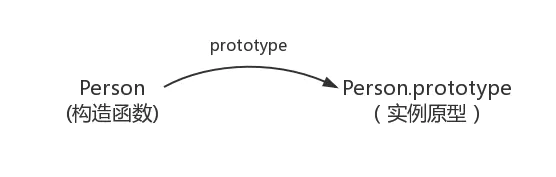
函数对象的 prototype 属性
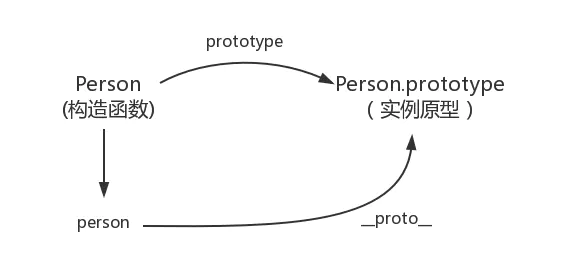
我们创建的每一个函数都有一个 prototype 属性,这个属性是一个指针,指向一个对象。这个对象的用途是包含可以由特定类型的所有实例共享的属性和方法,简单来说,该函数实例化的所有对象的__proto__的属性指向这个对象,它是该函数所有实例化对象的原型。
function Person() {}

// 为原型对象添加方法
Person.prototype.sayName = function () {
  alert(this.name);
};
下面我们来看一下它们之间的关系。

简易图
constructor 属性
当函数创建,prototype属性指向一个原型对象时,在默认情况下,这个原型对象将会获得一个 constructor 属性,这个属性是一个指针,指向 prototype 所在的函数对象。
拿前面的一个例子来说 Person.prototype.constructor 就指向 Person函数对象。
console.log(Person.prototype.constructor == Person);
下面我们来更新一下它们之间的关系图。
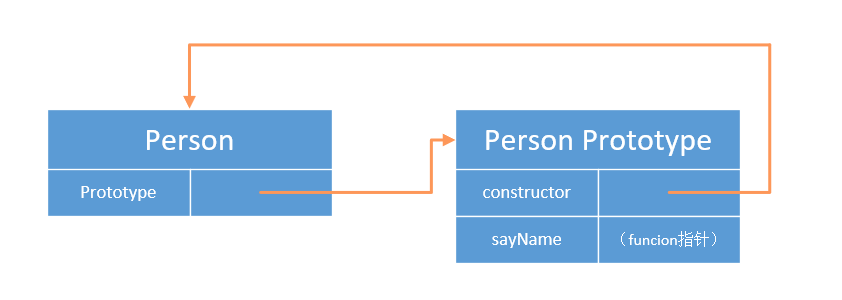
简易图
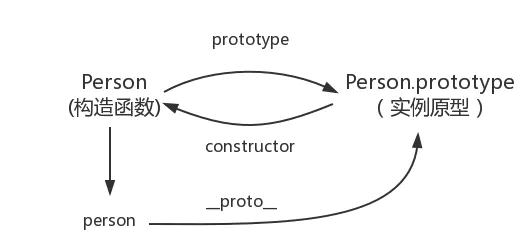
对象的 __proto__属性
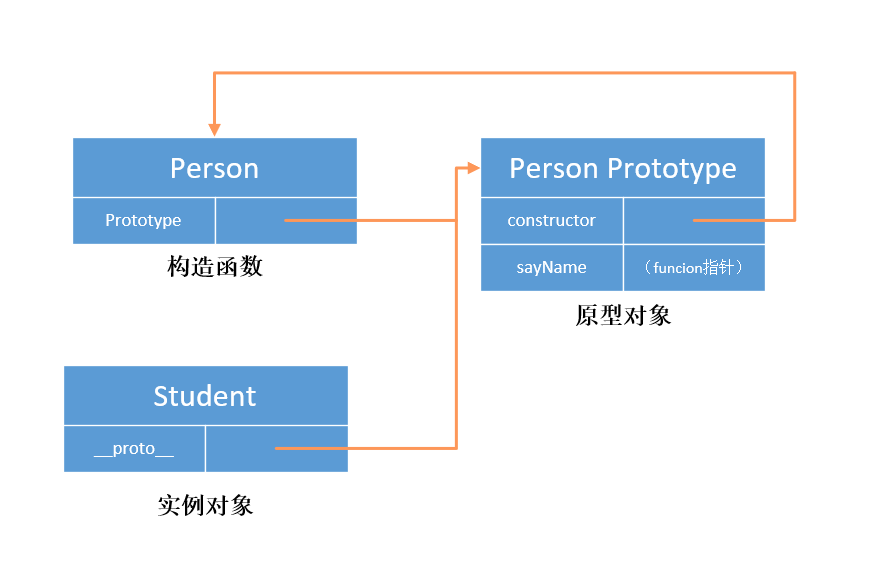
当我们调用构造函数创建一个新实例后,在这个实例的内部将包含一个指针,指向构造函数的原型对象.
根据前面的 Person 构造函数我们新建一个实例
var student = new Person();

console.log(student.__proto__ === Person.prototype); // true
从上面我们可以看出,这个连接是存在与实例与构造函数的原型对象之间的,而不是存在于实例和构造函数之间的。
下面我们来看一下现在这几个对象之间的关系
isPrototypeOf() 方法用于测试一个对象是否存在于另一个对象的原型链上。
console.log(Person.prototype.isPrototypeOf(student)); // true
简易图
1.3 原型属性
属性访问
每当代码读取对象的某个属性时,首先会在对象本身搜索这个属性,如果找到该属性就返回该属性的值,如果没有找到,则继续搜索该对象对应的原型对象,以此类推下去。
因为这样的搜索过程,因此我们如果在实例中添加一个属性时,这个属性就会屏蔽原型对象中保存的同名属性,因为在实例中搜索到该属性后就不会再向后搜索了。
属性判断
既然一个属性既可能是实例本身的,也有可能是其原型对象的,那么我们该如何来判断呢?
在属性确认存在的情况下,我们可以使用 hasOwnProperty()方法来判断一个属性是存在与实例中,还是存在于原型中
function Person() {}

Person.prototype.name = "laker";

var student = new Person();

console.log(student.name); // laker
console.log(student.hasOwnProperty("name")); // false

student.name = "xiaoming";
console.log(student.name); //xiaoming 屏蔽了原型对象中的 name 属性
console.log(student.hasOwnProperty("name")); // true
function hasPrototypeProperty(object, name) {
  return !object.hasOwnProperty(name) && name in object;
}
所有属性获取
function Person() {
  this.name = "KXY";
}
Person.prototype = {
  job: "student",
};

var kxy = new Person();
Object.defineProperty(kxy, "sex", {
  value: "female",
  enumerable: false,
});

console.log(Object.keys(kxy)); //["name"] //无法获取不可枚举的属性与原型链上继承的属性
console.log(Object.getOwnPropertyNames(kxy)); //["name", "sex"]
//for...in能获取原型链上继承的属性,无法获取不可枚举的属性
for (var pro in kxy) {
  console.log("kxy." + pro + " = " + kxy[pro]); // kxy.name = KXY
  //kxy.job = student
}
怎样判断属性是否为实例属性并且是否可枚举
如果想判断指定名称的属性是否为实例属性并且是否可枚举的,可以使用propertyIsEnumerable
function Student(userName) {
  this.userName = userName;
}
Student.prototype.sayHello = function () {
  console.log("hello" + this.userName);
};
var stu = new Student();
console.log(stu.propertyIsEnumerable("userName")); //true:userName为自身定义的实例属性
console.log(stu.propertyIsEnumerable("age")); // false:age属性不存在,返回false
console.log(stu.propertyIsEnumerable("sayHello")); // false :sayHello属于原型上的函数
//将userName属性设置为不可枚举
Object.defineProperty(stu, "userName", {
  enumerable: false,
});
console.log(stu.propertyIsEnumerable("userName")); // false: userName设置了不可枚举
1.4 Object.create( )方法
基本使用
该函数的主要作用是创建并返回一个指定原型和指定属性的新对象,语法格式如下:
Object.create(prototype, propertyDescriptor);
prototype属性为对象的原型(必须),可以为null,如果为null,则对象的原型为undefined.
propertyDescriptor表示的是属性描述符(可选),具体的格式如下:
propertyName:{
    value:'',
    writable:true,
    enumerable:true,
    configurable:true
}
基本实现:
 <script type="text/javascript">
      const person = {
        userName: "zhangsan",
        sayHello: function () {
          console.log("hello " + this.userName);
        },
      };
      const stu = Object.create(person);
      stu.userName = "lisi";
      stu.sayHello(); //hello lisi  覆盖了person中的userName属性原有的值
    </script>
通过以上的代码,可以看到stu对象的原型是person.也就是stu.__proto__===person
下面再来看一个案例:
var obj = Object.create(null, {
  userName: {
    value: "wangwu",
    writable: true,
    enumerable: true,
    configurable: true,
  },
  age: {
    value: 23,
  },
});
console.log(obj.userName);
console.log(obj.age);
obj.age = 26;
console.log(obj.age);
for (var o in obj) {
  console.log(o);
}
delete obj.userName;
console.log(obj.userName);
delete obj.age;
console.log(obj.age);
实现原理
通过如下的伪代码来查看对应的实现原理
Object.create = function (proto, propertiesObject) {
  //省略了其它判断操作
  function F() {}
  F.prototype = proto;
  if (propertiesObject) {
    Object.defineProperties(F, propertiesObject);
  }
  return new F();
};
通过以上的代码,我们可以得出如下的结论:
var f = new F();
f.__proto__ === F.prototype;
下面我们可以通过一个例子来验证一下:
var obj = { x: 12, y: 13 };
var test = Object.create(obj);
console.log(test);
console.log(test.x);
console.log(test.__proto__.x);
最后,这里演示一下Object.defineProperties方法的基本使用
该方法的主要作用就是添加或修改对象的属性。
如下代码所示:
var person = {};

Object.defineProperties(person, {
  userName: {
    value: "张三",
    enumerable: true,
  },
  age: {
    value: 12,
    enumerable: true,
  },
});
for (var p in person) {
  console.log(p);
}
person.age = 20;
console.log(person.age);
应用场景
对于Object.create方法很重要的一个应用场景是用来实现继承
function Person(name, sex) {
  this.name = name;
  this.sex = sex;
}
Person.prototype.getInfo = function () {
  console.log("getInfo: [name:" + this.name + ", sex:" + this.sex + "]");
};
var a = new Person("jojo", "femal");
var b = Object.create(Person.prototype);
console.log(a.name);
console.log(b.name);
console.log(b.getInfo);
下面看一下怎样实现完整的继承操作。
function Person(name, sex) {
  this.name = name;
  this.sex = sex;
}
Person.prototype.getInfo = function () {
  console.log("getInfo: [name:" + this.name + ", sex:" + this.sex + "]");
};
function Student(name, sex, age) {
  Person.call(this, name, sex);
  this.age = age;
}
Student.prototype = Object.create(Person.prototype);
var s = new Student("coco", "femal", 25);
s.getInfo();
下面,我们简单的分析一下,上面的代码。
对象s的__proto__指向的是s的构造函数Student的prototype
s.__proto__ === Student.prototype;
那么Student.prototype的__proto__指向什么呢?
Student.prototype.__proto__ === Person.prototype;
s.__proto__.__proto__ === Person.prototype;
而我们知道对象s是有Student 创建的,所以其构造函数为Student,所以我们在修改了原型以后,这里应该重新修正构造函数。
function Person(name, sex) {
  this.name = name;
  this.sex = sex;
}
Person.prototype.getInfo = function () {
  console.log("getInfo: [name:" + this.name + ", sex:" + this.sex + "]");
};
function Student(name, sex, age) {
  Person.call(this, name, sex);
  this.age = age;
}
Student.prototype = Object.create(Person.prototype);
Student.prototype.constructor = Student;
var s = new Student("coco", "femal", 25);
s.getInfo();
1.5 Object.create( )与new Object()的区别
Object.create( )以第一个传入的参数来创建对象的原型,可以传入 null 来创建一个干净的空对象(没有原型);
new Object 会创建一个原型指向 Object.prototype 的实例对象,使用 new Object()有一下注意;
注意:1、传入一个 null,返回一个继承 Object 的空对象;
2、传入一个基本类型(1/'hello'/true)的数据,返回的是一个(Number/String/Boolean)包装类
3、传入一个引用类型数据,返回的是传入的这个引用类型数据,即
var obj = { name: '张三' };var o = new Object(obj); o === obj
1.6 模拟new操作符的实现
在前面我们介绍了new操作符所做的三件事情,下面我们来模拟实现一下。
function Person(name, age) {
  this.name = name;
  this.age = age;
}
function New() {
  var obj = {};
  obj.__proto__ = Person.prototype;
  var res = Person.apply(obj, arguments);
  return typeof res === "object" ? res : obj;
}
console.log(New("zhangsan", 19));

//Fun为构造函数, args表示传参
function myNew(Fun, ...args) {
  // 1.在内存中创建一个新对象
  let obj = {};

  // 2.把新对象的原型指针指向构造函数的原型属性
  obj.__proto__ = Fun.prototype;

  // 3.改变this指向,并且执行构造函数内部的代码(传参)
  let res = Fun.apply(obj, args);

  // 4.判断函数执行结果的类型
  if (res instanceof Object) {
    return res;
  } else {
    return obj;
  }
}

let obj = myNew(Person, "XiaoMing", "18");
console.log("newObj:", obj);
1.7 原型链理解
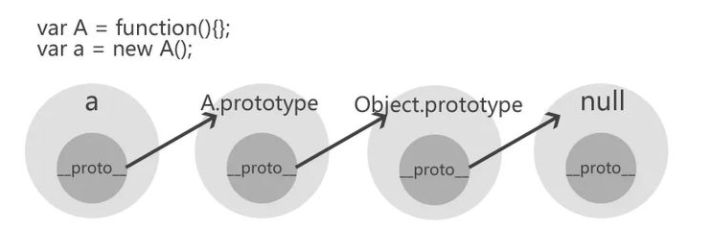
下面我们通过一个案例来看一个简单的原型链过程。初步代码如下
var A = function () {};
var a = new A();
通过a 实例沿着原型链第一次的追溯,__proto__属性指向A()构造函数的原型对象。
a.__proto__ === A.prototype;
a实例沿着原型链第二次的追溯,A原型对象的__proto__属性指向Object类型的原型对象.
a.__proto__.__proto__ === A.prototype.__proto__;
A.prototype.__proto__ === Object.prototype;
a 实例沿着原型链第三次追溯,Object类型的原型对象的__proto__属性为null
a.__proto__.__proto__.__proto__ === Object.prototype.__proto__;
Object.prototype.__proto__ === null;
具体的图如下所示:
下面,我们再来看一个案例:
function Super() {}

function Middle() {}
function Sub() {}

Middle.prototype = new Super();
Sub.prototype = new Middle();
var suber = new Sub();
对应的原型链如下图所示:
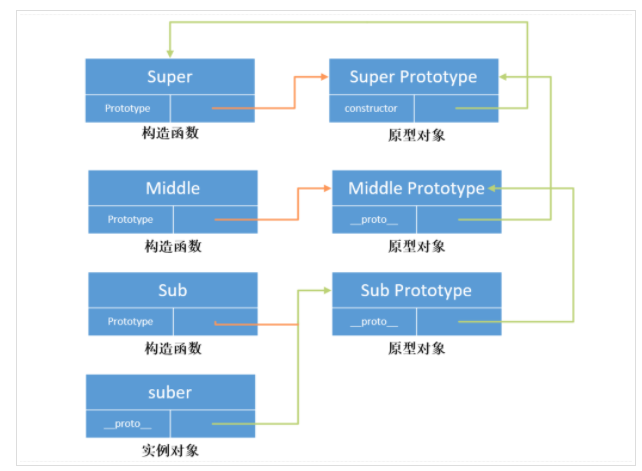
上面的图其实并不完整,因为漏掉了Object.所以完整的图如下
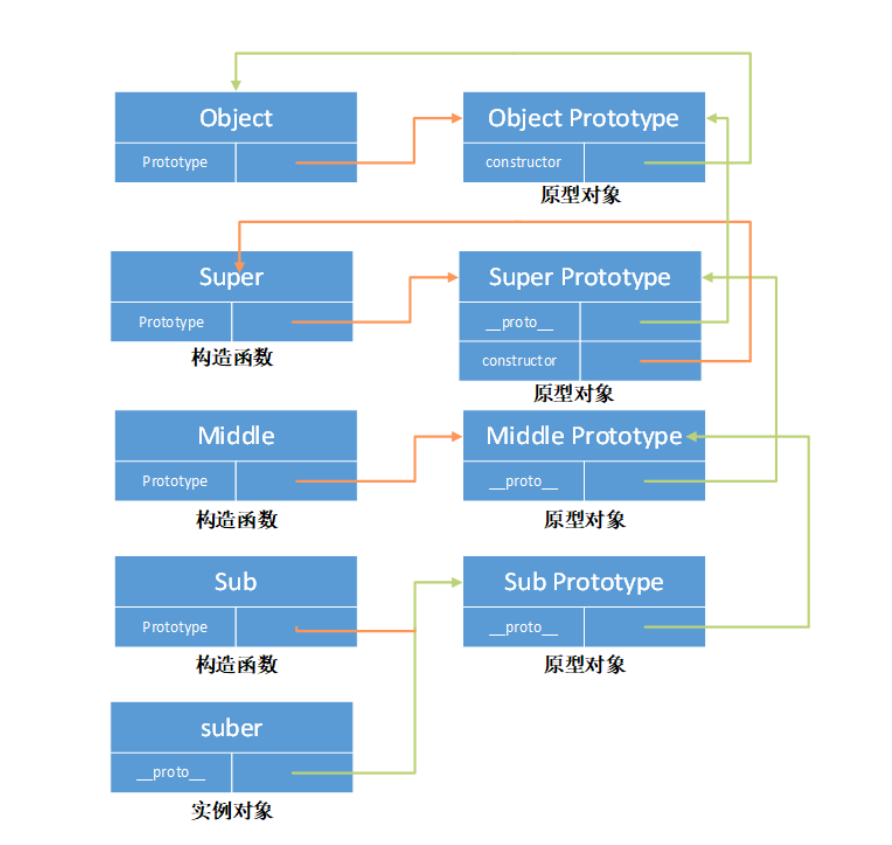
通过以上内容的讲解,我们对原型链有了更加深入的理解。
1.8 原型链特点
关于原型链的特点,主要有两个
第一个特点:由于原型链的存在,属性查找的过程不再只是查找自身的原型对象,而是会沿着整个原型链一直向上,直到追溯到Object.prototype.也就是说,当js引擎在查找对象的属性时,先查找对象本身是否存在该属性,如果不存在,会在原型链上查找,直到Object.prototype.如果Object.prototype上也找不到该属性,则返回undefined,如果期间在对象本身找到了或者是某个原型对象上找到了该属性,则会返回对应的结果。
由于这个特点,我们在自定义的对象中,可以调用某些未在自定义构造函数中定义的函数,例如toString( )函数。
function Person() {}
var p = new Person();
p.toString(); // 实际上调用的是Object.prototype.toString( )
第二个特点:由于属性查找会经历整个原型链,因此查找的链路越长,对性能的影响越大。
1.9 属性的区分
对象属性的查找往往会涉及到整个原型链,那么应该怎样区分属性是实例自身的还是从原型链中继承的呢?
关于这个问题,前面我们也已经讲解过,是通过hasOwnProperty( )函数来完成的,这里我们在简单的复习强调一下。
//只要in操作符返回true而hasOwnProperty()返回false,就可以确定属性是原型中的属性
function hasPrototypeProperty(obj, name) {
  return !obj.hasOwnProperty(name) && name in obj;
}
function Person(name, age) {
  this.name = name;
}
//在对象的原型上添加age属性
Person.prototype.age = 21;
var p = new Person("zhangsan");
console.log(p.hasOwnProperty("name")); //true
console.log(p.hasOwnProperty("age")); //false
name属性为实例属性,在调用hasOwnProperty方法时,会返回true。age属性为原型对象上的属性,在调用hasOwnProperty函数时,会返回false.
在使用for...in运算符,遍历对象的属性时,一般可以配合hasOwnProperty方法一起使用,检测某个属性是否为对象自身的属性,如果是,可以做相应的处理。
for (var p in person) {
  if (person.hasOwnProperty(p)) {
  }
}
2、Array 类型
Array类型中提供了丰富的函数用于对数组进行处理,例如,过滤,去重,遍历等等操作。
2.1 怎样 判断一个变量是数组还是对象
这里,我们可能会想到使用typeof运算符,因为typeof运算符是专门用于检测数据类型的,但是typeof运算符能够满足我们的需求吗?
var a = [1, 2, 3];
console.log(typeof a);
2.1.1 instanceof运算符
instanceof运算符用于通过查找原型链来检查某个变量是否为某个类型数据的实例,使用instanceof运算符可以判断一个变量是数组还是对象。
var a = [1, 2, 3];
console.log(a instanceof Array); // true
console.log(a instanceof Object); // true

var userInfo = { userName: "zhangsan" };
console.log(userInfo instanceof Array); // false
console.log(userInfo instanceof Object); // true
这里我们可以封装一个函数,用于判断变量是数组类型还是对象类型。
var a = [1, 2, 3];
function getType(o) {
  if (o instanceof Array) {
    return "Array";
  } else if (o instanceof Object) {
    return "Object";
  } else {
    return "参数类型不是Array也不是Object";
  }
}
console.log(getType(a));
2.1.2 通过构造函数来判断
判断一个变量是否是数组还是对象,其实就是判断变量的构造函数是Array类型还是Object类型。
因为一个对象的实例都是通过构造函数创建的。
var a = [1, 2, 3];
console.log(a.__proto__.constructor === Array);
console.log(a.__proto__.constructor === Object); // false
同样这里,这里我们也可以封装一个函数,来判断变量是数组类型还是对象类型。
function getType(o) {
  //获取构造函数
  var constructor = o.__proto__.constructor;
  if (constructor === Array) {
    return "Array";
  } else if (constructor === Object) {
    return "Object";
  } else {
    return "参数类型不是Array也不是Object";
  }
}
var a = [1, 2, 3];
console.log(getType(a));
2.1.3 通过toString( )函数来判断
我们知道,每种引用类型都会直接或间接继承Object类型,因此它们都包含toString( )函数。
不同数据类型的toString( )函数返回值也不一样,所以通过toString( )函数就可以判断一个变量是数组还是对象,当然,这里我们需要用到call方法来调用Object原型上的toString( )函数来完成类型的判断。
如下所示:
  var arr = [1, 2, 3];
      var obj = { userName: "zhangsan" };
      console.log(Object.prototype.toString.call(arr)); //[object Array]
      console.log(Object.prototype.toString.call(obj)); // [object Object]
 console.log(arr.toString()); // 1,2,3

// 注意:Object.prototype.toString不能对我们自定义构造函数所创建的对象类型做出准确的判断
function Person(name) {
  this.name = name
}
var p = new Person('zs')
console.log(Object.prototype.toString.call(p)); //[object Object]
2.1.4 通过Array.isArray( )函数来判断
Array.isArray 方法用来判断变量是否为数组。
var arr = [1, 2, 3];
var obj = { name: "zhangsan" };
console.log(Array.isArray(1)); //false
console.log(Array.isArray(arr)); //true
console.log(Array.isArray(obj)); //false
2.2 怎样过滤数组中满足条件的数据
对数组中的数据进行过滤,我们使用比较多的是filter方法。
<script>
      var fn = function (x) {
        return x % 2 !== 0;
      };
      var arr = [1, 2, 5, 6, 78, 9, 10];
      var result = arr.filter(fn);
      console.log(result);
    </script>
下面,我们再来看一下针对复杂类型数组的过滤。
下面案例是查找出年龄大于 16 的男生的信息。
var arr = [
  { gender: "男", age: 15 },
  { gender: "男", age: 17 },
  { gender: "女", age: 15 },
];
var fn = function (obj) {
  return obj.gender === "男" && obj.age > 16;
};
const result = arr.filter(fn);
console.log(result);
2.3 怎样对数组元素做累加处理
对数组中的元素做累加的处理,可以通过reduce函数来完成。
reduce函数最主要的作用就是做累加的操作,该函数接收一个函数作为累加器,将数组中的每个元素从左到右依次执行累加器,返回最终的处理结果。
reduce函数的语法如下:
arr.reduce(callback(accumulator, currentValue[, index[, array]])[, initialValue])
求出数组中所有元素累加的和
var arr = [1, 2, 3, 4, 5, 6];
var sum = arr.reduce(function (accumulator, currentValue) {
  return accumulator + currentValue;
}, 0);
console.log(sum);
2.4 怎样求数组中的最大值与最小值
关于查询出数组中的最大值与最小值的实现方式有很多种,下面我们来看一下具体的实现。
第一:通过prototype属性扩展min函数和max函数来实现求最小值与最大值
//最小值
Array.prototype.min = function () {
  var min = this[0];
  var len = this.length;
  for (var i = 1; i < len; i++) {
    if (this[i] < min) {
      min = this[i];
    }
  }
  return min;
};
//最大值
Array.prototype.max = function () {
  var max = this[0];
  var len = this.length;
  for (var i = 1; i < len; i++) {
    if (this[i] > max) {
      max = this[i];
    }
  }
  return max;
};
var arr = [1, 3, 6, 90, 23];
console.log(arr.min()); // 1
console.log(arr.max()); // 90
第二:通过数组的reduce函数来完成。
Array.prototype.max = function () {
  return this.reduce(function (preValue, currentValue) {
    return preValue > currentValue ? preValue : currentValue; //返回最大的值
  });
};
Array.prototype.min = function () {
  return this.reduce(function (preValue, currentValue) {
    return preValue < currentValue ? preValue : currentValue; // 返回最小的值
  });
};
var arr = [1, 3, 6, 90, 23];
console.log(arr.min()); //
console.log(arr.max()); //
第三:通过ES6中的扩展运算符来实现
这里我们可以通过ES6中的扩展运算符(...)来实现。
var arr = [1, 3, 6, 90, 23];
console.log(Math.min(...arr)); //
console.log(Math.max(...arr));
2.5 数组遍历的方式有哪些
数组遍历是我们针对数组最频繁的操作。下面我们看一下常见的数组的遍历方式。
通过 for 循环
这时最基本的实现方式
var arr = [1, 2, 3];
for (var i = 0; i < arr.length; i++) {
  console.log(arr[i]);
}
使用forEach( )函数
forEach函数也是我们遍历数组用的比较多的方法,forEach( )函数接收一个回调函数,参数分别表示当前执行的元素的值,当前值的索引和数组本身。
var arr = [1, 3, 6, 90, 23];
arr.forEach(function (element, index, array) {
  console.log(index + ":" + element);
});
使用map( )函数
`m
var arr = [1, 3, 6, 90, 23];
var result = arr.map(function (element, index, array) {
  console.log(index);
  return element * element;
});
console.log("result: ===", result);
在使用map函数的时候一定要注意:在map( )函数的回调函数中需要通过return将处理后的值进行返回,否则会返回undefined.
如下所示:
var arr = [1, 3, 6, 90, 23];
var result = arr.map(function (element, index, array) {
  // console.log(index);
  element * element;
});
console.log("result: ===", result);
在上面的计算中,将return关键字省略了,最终返回的结果是:
[undefined, undefined, undefined, undefined, undefined];
使用some( )函数与every( )函数
some( )函数与every( )函数的相似之处都是在对数组进行遍历的过程中,判断数组中是否有满足条件的元素,如果有满足条件的就返回true,否则返回false.
some()与every()的区别在于:some( )函数只要数组中某个元素满足条件就返回true,不会在对后面的元素进行判断。而every( )函数是数组中每个元素都要满足条件时才会返回true.
例如:要判断数组中是否有大于 6 的元素的时候,可以通过some( )函数来处理。
而要判断数组中是否所有的元素都大于 6,则需要通过every( )函数来处理。
function fn(element, index, array) {
  return element > 6;
}
var result = [1, 2, 3, 4, 5].some(fn); //false
console.log(result);
var result = [1, 2, 3, 4, 5, 7].some(fn);
console.log(result);
下面测试一下every( )函数
function fn(element, index, array) {
  return element > 6;
}
var result = [1, 2, 3, 4, 5, 7].every(fn); //false
console.log(result);
下面修改一下数组中的元素。
function fn(element, index, array) {
  return element > 6;
}
var result = [7, 8].every(fn); //true
console.log(result);
现在数组中的元素的值都是大于 6,所以返回的结果为true.
使用find( )函数
find( ) 函数用于数组的遍历,当找到第一个满足条件的元素值时,则直接返回该元素值,如果都找不到满足条件的,则返回undefined.
find( )方法的参数与forEach是一样的。
var arr = [1, 3, 6, 90, 23];
const result = arr.find(function (element, index, array) {
  return element > 6;
});
console.log(result); // 90
var arr = [1, 3, 6, 90, 23];
const result = arr.find(function (element, index, array) {
  return element > 100; //undefined
});
console.log(result);
以上就是我们比较常用的数组遍历的方式。当然还有我们前面讲解过的filter,reduce函数。
2.6 手动实现find方法
 <script>
      Array.prototype.findTest = function (fn) {
        for (var i = 0; i < this.length; i++) {
          var f = fn(this[i]);//把数组元素传递到函数中
          if (f) { //如果函数的返回值为true
            return this[i]; //则返回对应的数组元素
          }
        }
      };
      var arr = [1, 3, 6, 90, 23];
      var result = arr.findTest(function (item) {
        return item > 6;
      });
      console.log(result);
</script>
2.7 手动实现 filter 方法
filter函数内部需要一个回调函数,数组中的每个元素都会执行该回调函数,在执行回调函数时会将数组中的每个元素传递给回调函数的参数,在回调函数的函数体内进行判断,如果返回的是true,那么将该元素放到新数组arr中,如果判断的结果为false,则数据不会放到新数组arr中。
//模拟实现filter函数
Array.prototype.filterOne = function (fn) {
  var newArray = [];
  for (var i = 0; i < this.length; i++) {
    var f = fn(this[i]);
    if (f) {
      newArray.push(this[i]);
    }
  }
  return newArray;
};
var array = [65, 56, 89, 53];
var arr = array.filterOne(function (item) {
  return item >= 60;
});
console.log("arr=", arr);
2.8 手动实现 some 函数
some() 方法让数组中的每一个元素执行一次回调函数,在该回调函数中执行一些操作,只要有一个操作结果为真,就会返回 true。不会在对后面的元素进行判断,否则返回 false。
//手动模式some方法
Array.prototype.someTest = function (fn) {
  for (let i = 0; i < this.length; i++) {
    let f = fn(this[i]);
    if (f) {
      return f;
    }
  }
  return false;
};
let array = [1, 3, 5, 7, 90];
let result = array.someTest(function (item) {
  return item > 10;
});
console.log("result=", result);
2.9 手动实现 every 函数
该方法与some()方法不同,some()方法只要有一个符合条件就返回 true,而 every() 方法是数组中所有元素都要符合指定的条件,才会返回 true.
//手动模拟实现`every`方法
Array.prototype.everyTest = function (fn) {
  let f = true;
  for (let i = 0; i < this.length; i++) {
    let f = fn(this[i]);
    if (!f) {
      //只要有一个不符合,就立即返回false.
      return false;
    }
  }
  return f;
};
let array = [11, 31, 5, 71, 90];
let result = array.everyTest(function (item) {
  return item > 10;
});
console.log("result=", result); //false
2.10 手动实现 map 方法
map( )函数在对数据进行遍历的时候,会将数组中的每个元素做相应的处理,然后得到新的元素,并返回一个新的数组。
//手动实现map方法
Array.prototype.mapTest = function (fn) {
  let newArray = [];
  for (let i = 0; i < this.length; i++) {
    let f = fn(this[i], i, this);
    newArray.push(f);
  }
  return newArray;
};
var arr = [1, 3, 6, 90, 23];
var result = arr.mapTest(function (element, index, array) {
  console.log(index);
  return element * element;
});
console.log("result: ===", result);
2.11 手动实现 reduce 方法
Array.prototype.reduceTest = function (fn, initialValue) {
  //如果没有传递initialValue,我们将使用数组的第一项作为initialValue的值
  let hasInitialValue = initialValue !== undefined;
  let value = hasInitialValue ? initialValue : this[0];
  //如果没有传递initialValue,则索引从1开始,否则从0开始
  for (let i = hasInitialValue ? 0 : 1, len = this.length; i < len; i++) {
    value = fn(value, this[i], i, this);
  }
  return value;
};
var arr = [1, 2, 3, 4, 5, 6];
var sum = arr.reduceTest(function (accumulator, currentValue) {
  return accumulator + currentValue;
}, 0);
console.log(sum);
2.12 怎样实现数组的去重
数组去重是指当数组中出现重复的元素的时候,通过一定的方式,将重复的元素去掉。
利用数组遍历去重
// 数组去重
function fn(array) {
  var newArray = [];
  for (var i = 0; i < array.length; i++) {
    if (newArray.indexOf(array[i]) === -1) {
      newArray.push(array[i]);
    }
  }
  return newArray;
}
var arr = [1, 2, 3, 4, 5, 5, 6];
console.log(fn(arr));
利用键值对去重
function fn(array) {
  var obj = {},
    result = [],
    val;
  for (var i = 0; i < array.length; i++) {
    val = array[i];
    if (!obj[val]) {
      //根据key获取obj对象中的值
      obj[val] = "ok"; //表示该元素已经出现了
      result.push(val);
    }
  }
  return result;
}
var arr = [1, 2, 3, 4, 5, 5, 6];
console.log(fn(arr));
function fn(array) {
  var obj = {},
    result = [],
    val,
    type;
  for (var i = 0; i < array.length; i++) {
    val = array[i];
    type = typeof val;
    if (!obj[val]) {
      obj[val] = [type];
      result.push(val);
    } else if (obj[val].indexOf(type) < 0) {
      obj[val].push(type);
      result.push(val);
    }
  }
  return result;
}
var arr = [1, 2, 3, 4, 5, 5, 6, "6"];
console.log(fn(arr));
使用Set数据结构去重
具体的代码如下所示:
function fn(arr) {
  return Array.from(new Set(arr));
}
console.log(fn([1, 2, 3, 4, 5, 5, 6, "6"]));
2.13 怎样获取数组中最多的元素
利用键值对实现
<script>
      function fn(arr) {
        //如果数组中没有值,直接返回
        if (!arr.length) return;
        //如果只有一个值,返回1,表示出现了1次
        if (arr.length === 1) return 1;
        var result = {};
        //对数组进行遍历
        for (var i = 0; i < arr.length; i++) {
          if (!result[arr[i]]) {
            result[arr[i]] = 1;
          } else {
            result[arr[i]]++;
          }
        }
        //遍历result对象
        var keys = Object.keys(result);
        var maxNum = 0,
          maxElement;
        for (var i = 0; i < keys.length; i++) {
          if (result[keys[i]] > maxNum) {
            maxNum = result[keys[i]];
            maxElement = keys[i];
          }
        }
        return (
          "在数组中出现最多的元素是" + maxElement + ",共出现了" + maxNum + "次"
        );
      }
      var array = [1, 2, 3, 3, 3, 6, 6, 6, 6, 6, 7, 8, 9];
      console.log(fn(array));
    </script>
算法优化
function fn(array) {
  var result = {};
  var maxNum = 0;
  var maxElement = null;
  for (var i = 0; i < array.length; i++) {
    var val = array[i];
    result[val] === undefined ? (result[val] = 1) : result[val]++;
    if (result[val] > maxNum) {
      maxNum = result[val];
      maxElement = val;
    }
  }
  return "在数组中出现最多的元素是" + maxElement + ",共出现了" + maxNum + "次";
}
var array = [1, 2, 3, 3, 3, 6, 6, 6, 6, 6, 7, 8, 9];
console.log(fn(array));